Amazon Rolls Out Pre-Submission Main Image Checks to Protect Listings from Suppression
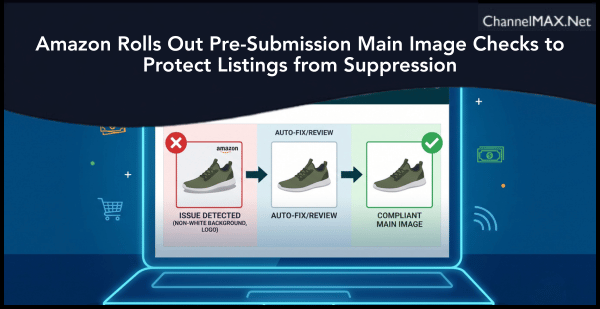
New one-by-one listing creation feature in Seller Central automatically detects non-white backgrounds, text, logos, and watermarks before you hit submit
By ChannelMAX Staff Writer
Oct-2026#01
A new quality control layer is now live inside Amazon Seller Central, and it is designed to catch main image problems before they ever reach the customer-facing detail page.
Sellers who create listings one at a time on desktop or mobile will now see an automatic compliance check each time they upload a main image. The system scans for four specific defect categories: non-white backgrounds, text, logos, graphics, and watermarks. If any of these issues are detected, an Issue detected error appears directly on the main image tile, and the seller must either fix the problem or formally acknowledge it before the listing can be submitted.
The update was announced on Seller Central as a workflow enhancement for individual listing creation, not as a change to Amazon's underlying image requirements. The rules themselves remain the same. What is new is the timing. Instead of discovering an image violation days after submission when a listing is already suppressed from search, sellers now get that feedback at the moment of creation.
Also Read: Amazon Unveils Smarter AI Seller Assistant, Free Amazon Quick Plus Subscription at Accelerate 2026
How the Fix Image Workflow Operates
When an issue is flagged, the seller clicks Fix image on the main image tile. A disclaimer appears, and after accepting it, three paths become available. The first option is to use a corrected image generated by Amazon, if one is available. The system displays the corrected version alongside a description of what was changed, such as Added white background or Text, logo, watermark, graphics removed successfully. A Show original toggle lets sellers compare the corrected image against their original upload, and the corrected image can be zoomed in and out for detailed inspection.
The second option is to upload a different image. Any new upload goes through the same compliance check, so sellers cannot bypass the system by simply swapping in another defective file.
The third option is Fix later and save. This acknowledges the defect and allows the seller to proceed with the listing submission. However, Amazon explicitly warns that choosing this path means the listing will be submitted with the defective image. It may then be suppressed after review.
If Amazon cannot generate a corrected image for a particular defect, the seller must either upload a compliant replacement or select Fix later. Closing the panel without choosing an option leaves the error active and keeps the Submit button disabled.
What Amazon's Main Image Rules Actually Require
The new check enforces long-standing requirements that many sellers still struggle with. Main images must have a pure white background using RGB values of 255, 255, 255. Off-white, gray, or any other background color triggers a defect flag. The product itself must fill at least 85 percent of the image frame. Main images cannot contain text, logos, borders, color blocks, watermarks, or other graphics over the product or in the background. Multiple views or color variations in a single main image are also prohibited and can trigger suppression.
For sellers who want the zoom feature enabled on their listings, images should be at least 1000 pixels on the longest side, with 1600 pixels or more recommended for optimal quality. Accepted file formats include JPEG, PNG, TIFF, and GIF. These rules apply across product categories, and violations result in search suppression. When a listing is suppressed, it may still show as Active in Seller Central, but the Amazon detail page is no longer accessible to customers.
Why Pre-Submission Detection Matters for Sellers
The practical benefit of this feature is that it shifts image compliance from a post-submission recovery problem into a pre-submission quality gate. For sellers who create listings in volume, suppression can be costly. A suppressed listing is invisible in search results and cannot be purchased. Advertising spend on a suppressed listing delivers no return. The longer a suppression goes undetected, the more sales are lost. Catching a defect before submission eliminates that entire cycle of lost visibility and reactive case management.
The feature also reduces reliance on Seller Support for routine image compliance issues. Sellers who previously submitted listings and then waited for a suppression notification now receive immediate feedback within the creation workflow itself.
It is important to note that this feature is rolling out gradually. Amazon has stated that sellers should check their listing creation workflow to confirm whether it is available in their store. The check applies to one-by-one listing creation on desktop and mobile. Bulk file uploads, API-based listing creation, and third-party integrations are not covered by this announcement.
Additional Tools for Managing Image Suppression
Sellers who already have suppressed listings can use the Listing Quality and Suppressed Listings Report to identify which ASINs are affected and why. The report is available under Inventory Reports by selecting the Listing Quality and Suppressed Listing Report type in Excel format. It includes specific suppression reasons in the Alert Name column and can be uploaded back after corrections to fix multiple issues at once.
When correcting a suppressed listing, Amazon recommends replacing the main image rather than deleting it, because every ASIN requires a main image to remain active. After a compliant image is uploaded, it can take up to 24 hours for the listing to become available in search and browse again.
The new pre-submission main image check in Seller Central gives sellers a real opportunity to stop image suppression before it starts. The feature does not change what Amazon requires. It changes when sellers find out whether their image meets those requirements.
For sellers who create listings one at a time, the workflow is straightforward. Upload the main image, watch for the Issue detected error, and use the Fix image panel to resolve or acknowledge any defects before submitting.
The safest approach is to treat every Issue detected flag as a mandatory fix rather than a suggestion. Choosing Fix later and submitting with a defective image leaves the listing exposed to suppression after review. Resolving the issue at the point of creation is the only way to guarantee that the listing goes live without an image-related visibility risk.
Sellers should also keep in mind that this check covers only two defect categories: non-white backgrounds and text, logo, graphic, or watermark issues. Other image defects can still lead to suppression. Passing the pre-submission check is a useful first step, but it is not a comprehensive image compliance certificate.
For more details on how to fix image compliance issues during listing creation, sellers can visit the Add one product at a time help page in Seller Central.
Also Read: Amazon Revamps Seller Central With Smarter Workspaces, AI Support and Faster Workflows
Disclaimer:
Amazon is the registered trademark of the e-commerce brand.
About ChannelMAX.NET:
ChannelMAX offers Amazon Repricer that runs on the latest AI Repricing algorithm to do Amazon Pricing Management or Amazon Repricing. Based on Amazon SP API, the repricing engine or repricer runs 24/7 and efficiently manages Amazon prices to maximize your BuyBox with profit optimization. Established in 2005, ChannelMAX has been integrated with Amazon technology since 2007, helping thousands of third-party sellers on various eCommerce platforms. Some of the eCommerce platforms, aka marketplaces, supported by ChannelMAX.NET, are Amazon, Walmart, eBay, and Shopify. Some of ChannelMAX key offerings include ChannelMAX Amazon Repricer, 2ndly, ChannelMAX Amazon FBA Audits and FBA Refunds management, an offering for managing Amazon FBA Refunds Reimbursement management for lost or damaged or misplaced inventory for which Amazon is responsible and for which sellers deserve appropriate credit reimbursement from Amazon. ChannelMAX Services offer Remote (aka Virtual) Full-Time eCommerce Assistant to help 3P sellers run their daytoday business.
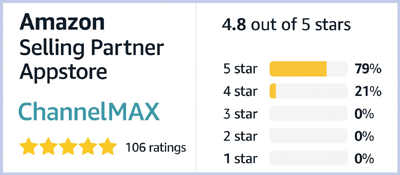
Check ChannelMAX at Amazon Selling Partner Appstore, an application with a 5 star rating.
By ChannelMAX Staff Writer
Oct-2026#01
A new quality control layer is now live inside Amazon Seller Central, and it is designed to catch main image problems before they ever reach the customer-facing detail page.
Sellers who create listings one at a time on desktop or mobile will now see an automatic compliance check each time they upload a main image. The system scans for four specific defect categories: non-white backgrounds, text, logos, graphics, and watermarks. If any of these issues are detected, an Issue detected error appears directly on the main image tile, and the seller must either fix the problem or formally acknowledge it before the listing can be submitted.
The update was announced on Seller Central as a workflow enhancement for individual listing creation, not as a change to Amazon's underlying image requirements. The rules themselves remain the same. What is new is the timing. Instead of discovering an image violation days after submission when a listing is already suppressed from search, sellers now get that feedback at the moment of creation.
Also Read: Amazon Unveils Smarter AI Seller Assistant, Free Amazon Quick Plus Subscription at Accelerate 2026
How the Fix Image Workflow Operates
When an issue is flagged, the seller clicks Fix image on the main image tile. A disclaimer appears, and after accepting it, three paths become available. The first option is to use a corrected image generated by Amazon, if one is available. The system displays the corrected version alongside a description of what was changed, such as Added white background or Text, logo, watermark, graphics removed successfully. A Show original toggle lets sellers compare the corrected image against their original upload, and the corrected image can be zoomed in and out for detailed inspection.
The second option is to upload a different image. Any new upload goes through the same compliance check, so sellers cannot bypass the system by simply swapping in another defective file.
The third option is Fix later and save. This acknowledges the defect and allows the seller to proceed with the listing submission. However, Amazon explicitly warns that choosing this path means the listing will be submitted with the defective image. It may then be suppressed after review.
If Amazon cannot generate a corrected image for a particular defect, the seller must either upload a compliant replacement or select Fix later. Closing the panel without choosing an option leaves the error active and keeps the Submit button disabled.
What Amazon's Main Image Rules Actually Require
The new check enforces long-standing requirements that many sellers still struggle with. Main images must have a pure white background using RGB values of 255, 255, 255. Off-white, gray, or any other background color triggers a defect flag. The product itself must fill at least 85 percent of the image frame. Main images cannot contain text, logos, borders, color blocks, watermarks, or other graphics over the product or in the background. Multiple views or color variations in a single main image are also prohibited and can trigger suppression.
For sellers who want the zoom feature enabled on their listings, images should be at least 1000 pixels on the longest side, with 1600 pixels or more recommended for optimal quality. Accepted file formats include JPEG, PNG, TIFF, and GIF. These rules apply across product categories, and violations result in search suppression. When a listing is suppressed, it may still show as Active in Seller Central, but the Amazon detail page is no longer accessible to customers.
Why Pre-Submission Detection Matters for Sellers
The practical benefit of this feature is that it shifts image compliance from a post-submission recovery problem into a pre-submission quality gate. For sellers who create listings in volume, suppression can be costly. A suppressed listing is invisible in search results and cannot be purchased. Advertising spend on a suppressed listing delivers no return. The longer a suppression goes undetected, the more sales are lost. Catching a defect before submission eliminates that entire cycle of lost visibility and reactive case management.
The feature also reduces reliance on Seller Support for routine image compliance issues. Sellers who previously submitted listings and then waited for a suppression notification now receive immediate feedback within the creation workflow itself.
It is important to note that this feature is rolling out gradually. Amazon has stated that sellers should check their listing creation workflow to confirm whether it is available in their store. The check applies to one-by-one listing creation on desktop and mobile. Bulk file uploads, API-based listing creation, and third-party integrations are not covered by this announcement.
Additional Tools for Managing Image Suppression
Sellers who already have suppressed listings can use the Listing Quality and Suppressed Listings Report to identify which ASINs are affected and why. The report is available under Inventory Reports by selecting the Listing Quality and Suppressed Listing Report type in Excel format. It includes specific suppression reasons in the Alert Name column and can be uploaded back after corrections to fix multiple issues at once.
When correcting a suppressed listing, Amazon recommends replacing the main image rather than deleting it, because every ASIN requires a main image to remain active. After a compliant image is uploaded, it can take up to 24 hours for the listing to become available in search and browse again.
The new pre-submission main image check in Seller Central gives sellers a real opportunity to stop image suppression before it starts. The feature does not change what Amazon requires. It changes when sellers find out whether their image meets those requirements.
For sellers who create listings one at a time, the workflow is straightforward. Upload the main image, watch for the Issue detected error, and use the Fix image panel to resolve or acknowledge any defects before submitting.
The safest approach is to treat every Issue detected flag as a mandatory fix rather than a suggestion. Choosing Fix later and submitting with a defective image leaves the listing exposed to suppression after review. Resolving the issue at the point of creation is the only way to guarantee that the listing goes live without an image-related visibility risk.
Sellers should also keep in mind that this check covers only two defect categories: non-white backgrounds and text, logo, graphic, or watermark issues. Other image defects can still lead to suppression. Passing the pre-submission check is a useful first step, but it is not a comprehensive image compliance certificate.
For more details on how to fix image compliance issues during listing creation, sellers can visit the Add one product at a time help page in Seller Central.
Also Read: Amazon Revamps Seller Central With Smarter Workspaces, AI Support and Faster Workflows
Disclaimer:
Amazon is the registered trademark of the e-commerce brand.
About ChannelMAX.NET:
ChannelMAX offers Amazon Repricer that runs on the latest AI Repricing algorithm to do Amazon Pricing Management or Amazon Repricing. Based on Amazon SP API, the repricing engine or repricer runs 24/7 and efficiently manages Amazon prices to maximize your BuyBox with profit optimization. Established in 2005, ChannelMAX has been integrated with Amazon technology since 2007, helping thousands of third-party sellers on various eCommerce platforms. Some of the eCommerce platforms, aka marketplaces, supported by ChannelMAX.NET, are Amazon, Walmart, eBay, and Shopify. Some of ChannelMAX key offerings include ChannelMAX Amazon Repricer, 2ndly, ChannelMAX Amazon FBA Audits and FBA Refunds management, an offering for managing Amazon FBA Refunds Reimbursement management for lost or damaged or misplaced inventory for which Amazon is responsible and for which sellers deserve appropriate credit reimbursement from Amazon. ChannelMAX Services offer Remote (aka Virtual) Full-Time eCommerce Assistant to help 3P sellers run their daytoday business.
Check ChannelMAX at Amazon Selling Partner Appstore, an application with a 5 star rating.