Amazon outlines AI tools to help sellers manage the holiday rush

Seller Central update explains how Amazon Quick, the Selling Partner plugin and Amazon Ads MCP Server can support listing preparation, inventory decisions and advertising throughout the season
By ChannelMAX Staff Writer
Nov-2026#04
Holiday selling requires more than strong discounts. Sellers must prepare product listings, maintain sufficient inventory and adjust advertising as demand changes. An update on Amazon’s US Seller Central platform explains how its AI tools can help businesses manage these tasks before, during and after peak shopping periods.
Titled “Win the holidays with AI at every phase,” the update outlines a season-long approach using Amazon Quick, the Selling Partner plugin and the Amazon Ads MCP Server. These tools can help sellers access business insights faster and reduce time spent moving between dashboards. However, Amazon advises sellers to review every AI-suggested change before confirming it and ask the assistant to identify the data supporting its recommendations.
What the three tools offer
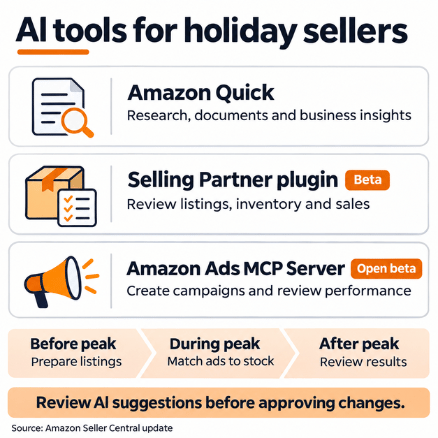
Amazon Quick is an AI workspace that can conduct research, create documents and spreadsheets, and connect with business email, calendars and files. The Selling Partner plugin, described as being in beta in the holiday update, connects Quick with Seller Central data, including listings, inventory and sales. Sellers can ask questions in everyday language and take supported actions through the connected assistant.
The Amazon Ads MCP Server provides a separate connection for advertising. MCP stands for Model Context Protocol, a standard that allows AI systems to communicate with external tools. Available in open beta, the server connects compatible AI agents with Amazon Ads functions. These include creating and updating campaigns, requesting performance reports and managing supported advertising settings.
Also Read: Amazon adds AI-powered Reporter Assistant to help brands file IP complaints
Prepare listings before peak demand
Amazon recommends using the Selling Partner plugin to audit holiday product listings. This includes reviewing titles, bullet points, images and keywords to identify areas that need attention. Sellers can also compare current sales velocity with the corresponding period last year to help estimate demand for important holiday products.
A practical starting point is to review a small group of priority ASINs, or Amazon Standard Identification Numbers. These could include seasonal bestsellers, products scheduled for promotions and items with sufficient inventory to support higher sales.
Before approving listing changes, sellers should check that suggested wording accurately reflects product specifications. Demand forecasts should also account for planned discounts, supplier lead times and previous stockouts.
Prepare advertising alongside inventory
The update recommends using the Ads MCP Server to launch or adjust Sponsored Products and Sponsored Brands campaigns for priority holiday products. Sellers can also check which ASINs qualify for each advertising format before preparing campaigns.
Amazon’s separate guidance explains that its MCP tools can combine several campaign-building steps into one workflow. For example, a Sponsored Products workflow can coordinate campaign creation, ad group setup and ad creation, producing a campaign for review and approval.
For sellers, this can reduce repetitive setup work. Campaign budgets, targeting and product selection still require careful review before launch.
Use stock levels to guide peak-season spending
During busy shopping periods, Amazon suggests using the Selling Partner plugin to identify products with enough inventory to handle additional traffic. These insights can help sellers decide which campaigns to pause and where to redirect advertising budgets.
The update also says the Ads MCP Server can provide near real-time performance summaries refreshed every 15 minutes, without requiring sellers to open the advertising console. A useful approach is to review inventory and advertising performance together. Before increasing spending on a product, sellers should assess whether available stock and expected replenishment can support additional orders.
They should also ask which reporting period and data timestamp a performance summary uses before making substantial changes.
Extend opportunities beyond major shopping events
Amazon’s guidance covers the period after peak promotional days as well. Sellers can use Quick to review holiday results, identify promotions worth repeating for last-minute shoppers and assess restocking opportunities. For a more useful analysis, sellers should examine profitability alongside sales growth. Higher order volumes may not translate into stronger profits if discounts and advertising costs absorb too much of the margin.
Comparisons should use clearly defined periods and account for changes in prices, promotions and stock availability. This can help sellers distinguish repeatable success from a temporary increase in demand.
Check availability and permissions
Access should be confirmed before these tools become part of a seller’s holiday operating plan. Amazon’s help guidance says the Selling Partner plugin is rolling out gradually. Sellers may receive immediate access or join a waitlist, with an email notification when access becomes available.
Secondary users need permission from an account owner or administrator to authorize the plugin. Amazon directs users who cannot complete authorization to the Manage Agents settings in Seller Central. Amazon also recommends opting out of using AI assistant interactions for model training or improvement where that privacy setting is available.
The advertising connection has separate requirements. Amazon’s published open-beta announcement states that the Ads MCP Server and its tools are available globally to Amazon Ads partners with active API credentials. Sellers should confirm the available integration and access requirements with their advertising technology provider, agency or technical team.
Use specific prompts and review recommendations
Clear instructions can make AI responses more useful. Sellers should specify the marketplace, ASINs, date range, metrics and desired output.
For an inventory review, a seller could ask:
“Review these ASINs in the US marketplace using the past 14 days of sales. Estimate days of stock remaining, identify products at risk of running out and explain your assumptions. Show the data timestamps and do not make changes.”
For an advertising review, a suggested prompt is:
“Compare these campaigns over the past seven days by spend, attributed sales and return on ad spend. Recommend budget changes within my existing total daily budget. Present the recommendations for approval before applying them.”
These examples should be adapted to the capabilities available in the connected tools. Sellers should distinguish clearly between requesting analysis and authorizing an action.
Turning AI insights into better holiday decisions
Amazon’s Seller Central update offers a practical framework for using AI throughout the holiday season. Sellers can use the tools to prepare listings, assess demand, connect advertising decisions with stock availability and review results after major events.
The potential benefit is faster, better-informed decision-making with less repetitive work. Starting with a limited group of products, checking the supporting data and reviewing proposed actions can help sellers build confidence before expanding their use of AI across the business.
Also Read: Amazon’s 2027 US fee update raises FBA costs and reshapes inventory planning
Disclaimer:
Amazon is the registered trademark of the e-commerce brand.
About ChannelMAX.NET:
ChannelMAX offers Amazon Repricer that runs on the latest AI Repricing algorithm to do Amazon Pricing Management or Amazon Repricing. Based on Amazon SP API, the repricing engine or repricer runs 24/7 and efficiently manages Amazon prices to maximize your BuyBox with profit optimization. Established in 2005, ChannelMAX has been integrated with Amazon technology since 2007, helping thousands of third-party sellers on various eCommerce platforms. Some of the eCommerce platforms, aka marketplaces, supported by ChannelMAX.NET, are Amazon, Walmart, eBay, and Shopify. Some of ChannelMAX key offerings include ChannelMAX Amazon Repricer, 2ndly, ChannelMAX Amazon FBA Audits and FBA Refunds management, an offering for managing Amazon FBA Refunds Reimbursement management for lost or damaged or misplaced inventory for which Amazon is responsible and for which sellers deserve appropriate credit reimbursement from Amazon. ChannelMAX Services offer Remote (aka Virtual) Full-Time eCommerce Assistant to help 3P sellers run their daytoday business.
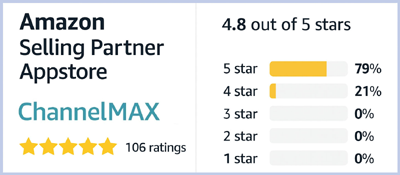
Check ChannelMAX at Amazon Selling Partner Appstore, an application with a 5 star rating.
By ChannelMAX Staff Writer
Nov-2026#04
Holiday selling requires more than strong discounts. Sellers must prepare product listings, maintain sufficient inventory and adjust advertising as demand changes. An update on Amazon’s US Seller Central platform explains how its AI tools can help businesses manage these tasks before, during and after peak shopping periods.
Titled “Win the holidays with AI at every phase,” the update outlines a season-long approach using Amazon Quick, the Selling Partner plugin and the Amazon Ads MCP Server. These tools can help sellers access business insights faster and reduce time spent moving between dashboards. However, Amazon advises sellers to review every AI-suggested change before confirming it and ask the assistant to identify the data supporting its recommendations.
What the three tools offer
Amazon Quick is an AI workspace that can conduct research, create documents and spreadsheets, and connect with business email, calendars and files. The Selling Partner plugin, described as being in beta in the holiday update, connects Quick with Seller Central data, including listings, inventory and sales. Sellers can ask questions in everyday language and take supported actions through the connected assistant.
The Amazon Ads MCP Server provides a separate connection for advertising. MCP stands for Model Context Protocol, a standard that allows AI systems to communicate with external tools. Available in open beta, the server connects compatible AI agents with Amazon Ads functions. These include creating and updating campaigns, requesting performance reports and managing supported advertising settings.
Also Read: Amazon adds AI-powered Reporter Assistant to help brands file IP complaints
Prepare listings before peak demand
Amazon recommends using the Selling Partner plugin to audit holiday product listings. This includes reviewing titles, bullet points, images and keywords to identify areas that need attention. Sellers can also compare current sales velocity with the corresponding period last year to help estimate demand for important holiday products.
A practical starting point is to review a small group of priority ASINs, or Amazon Standard Identification Numbers. These could include seasonal bestsellers, products scheduled for promotions and items with sufficient inventory to support higher sales.
Before approving listing changes, sellers should check that suggested wording accurately reflects product specifications. Demand forecasts should also account for planned discounts, supplier lead times and previous stockouts.
Prepare advertising alongside inventory
The update recommends using the Ads MCP Server to launch or adjust Sponsored Products and Sponsored Brands campaigns for priority holiday products. Sellers can also check which ASINs qualify for each advertising format before preparing campaigns.
Amazon’s separate guidance explains that its MCP tools can combine several campaign-building steps into one workflow. For example, a Sponsored Products workflow can coordinate campaign creation, ad group setup and ad creation, producing a campaign for review and approval.
For sellers, this can reduce repetitive setup work. Campaign budgets, targeting and product selection still require careful review before launch.
Use stock levels to guide peak-season spending
During busy shopping periods, Amazon suggests using the Selling Partner plugin to identify products with enough inventory to handle additional traffic. These insights can help sellers decide which campaigns to pause and where to redirect advertising budgets.
The update also says the Ads MCP Server can provide near real-time performance summaries refreshed every 15 minutes, without requiring sellers to open the advertising console. A useful approach is to review inventory and advertising performance together. Before increasing spending on a product, sellers should assess whether available stock and expected replenishment can support additional orders.
They should also ask which reporting period and data timestamp a performance summary uses before making substantial changes.
Extend opportunities beyond major shopping events
Amazon’s guidance covers the period after peak promotional days as well. Sellers can use Quick to review holiday results, identify promotions worth repeating for last-minute shoppers and assess restocking opportunities. For a more useful analysis, sellers should examine profitability alongside sales growth. Higher order volumes may not translate into stronger profits if discounts and advertising costs absorb too much of the margin.
Comparisons should use clearly defined periods and account for changes in prices, promotions and stock availability. This can help sellers distinguish repeatable success from a temporary increase in demand.
Check availability and permissions
Access should be confirmed before these tools become part of a seller’s holiday operating plan. Amazon’s help guidance says the Selling Partner plugin is rolling out gradually. Sellers may receive immediate access or join a waitlist, with an email notification when access becomes available.
Secondary users need permission from an account owner or administrator to authorize the plugin. Amazon directs users who cannot complete authorization to the Manage Agents settings in Seller Central. Amazon also recommends opting out of using AI assistant interactions for model training or improvement where that privacy setting is available.
The advertising connection has separate requirements. Amazon’s published open-beta announcement states that the Ads MCP Server and its tools are available globally to Amazon Ads partners with active API credentials. Sellers should confirm the available integration and access requirements with their advertising technology provider, agency or technical team.
Use specific prompts and review recommendations
Clear instructions can make AI responses more useful. Sellers should specify the marketplace, ASINs, date range, metrics and desired output.
For an inventory review, a seller could ask:
“Review these ASINs in the US marketplace using the past 14 days of sales. Estimate days of stock remaining, identify products at risk of running out and explain your assumptions. Show the data timestamps and do not make changes.”
For an advertising review, a suggested prompt is:
“Compare these campaigns over the past seven days by spend, attributed sales and return on ad spend. Recommend budget changes within my existing total daily budget. Present the recommendations for approval before applying them.”
These examples should be adapted to the capabilities available in the connected tools. Sellers should distinguish clearly between requesting analysis and authorizing an action.
Turning AI insights into better holiday decisions
Amazon’s Seller Central update offers a practical framework for using AI throughout the holiday season. Sellers can use the tools to prepare listings, assess demand, connect advertising decisions with stock availability and review results after major events.
The potential benefit is faster, better-informed decision-making with less repetitive work. Starting with a limited group of products, checking the supporting data and reviewing proposed actions can help sellers build confidence before expanding their use of AI across the business.
Also Read: Amazon’s 2027 US fee update raises FBA costs and reshapes inventory planning
Disclaimer:
Amazon is the registered trademark of the e-commerce brand.
About ChannelMAX.NET:
ChannelMAX offers Amazon Repricer that runs on the latest AI Repricing algorithm to do Amazon Pricing Management or Amazon Repricing. Based on Amazon SP API, the repricing engine or repricer runs 24/7 and efficiently manages Amazon prices to maximize your BuyBox with profit optimization. Established in 2005, ChannelMAX has been integrated with Amazon technology since 2007, helping thousands of third-party sellers on various eCommerce platforms. Some of the eCommerce platforms, aka marketplaces, supported by ChannelMAX.NET, are Amazon, Walmart, eBay, and Shopify. Some of ChannelMAX key offerings include ChannelMAX Amazon Repricer, 2ndly, ChannelMAX Amazon FBA Audits and FBA Refunds management, an offering for managing Amazon FBA Refunds Reimbursement management for lost or damaged or misplaced inventory for which Amazon is responsible and for which sellers deserve appropriate credit reimbursement from Amazon. ChannelMAX Services offer Remote (aka Virtual) Full-Time eCommerce Assistant to help 3P sellers run their daytoday business.
Check ChannelMAX at Amazon Selling Partner Appstore, an application with a 5 star rating.