Amazon Product Videos: How to Boost Conversions with Engaging Visual Content
Learn how product videos can help you increase sales, build trust, and improve your Amazon listing performance.
By ChannelMAX Staff Writer
Oct-2025#05
In today’s online shopping world, visuals play a huge role. Shoppers often decide what to buy based on what they see. While clear and attractive images are a must, videos have now become the next big thing that grabs attention and drives more sales.
Amazon product videos help sellers show their products in action—how they look, work, and fit into everyday life. This makes customers understand the product better and feel more confident when buying it. A short demo video can effectively highlight features and benefits, while a lifestyle video can show how the product solves real-life problems or adds value.
Videos also help listings stand out from the crowd, build trust, and reduce returns by giving buyers a realistic view of what to expect.
In this article, we’ll explore what Amazon product videos are, why they’re so important, how to create them effectively, and some best practices to help you get the most out of them.
What Are Amazon Product Videos?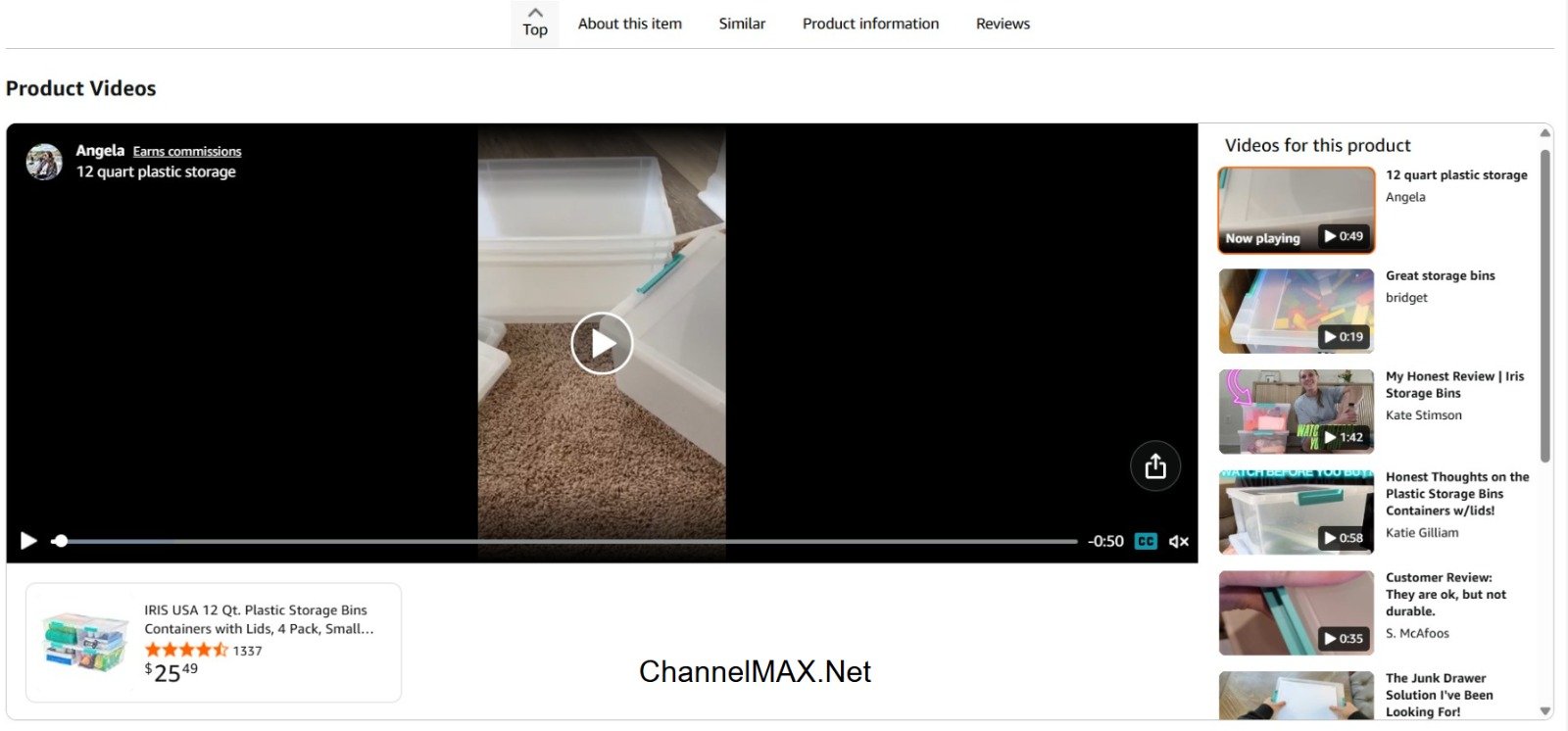
Amazon product videos are short clips that sellers add to their product listing pages to help shoppers understand the product better. These videos can show how the product works, what it looks like in real life, or even include reviews from genuine customers.
They usually appear in the product’s image section or under “Related Videos.” The videos make shopping easier by showing more details than pictures or text can, helping buyers feel more confident before purchasing.
Only sellers who are part of the Amazon Brand Registry or are Amazon Vendors can upload videos directly. Other sellers may have videos added through the Customer Videos section if customers share them.
You can usually find these videos in the following places on a product page:
a. In the main image area, next to the product photos
b. In the “Videos” section below the product images
c. In the “From the Brand” or “Related Videos” sections
These videos are a great way to tell your product’s story and show its value more clearly than pictures or descriptions alone.
Why Are Product Videos Important on Amazon?
Product videos are a powerful tool that can significantly impact how shoppers perceive your products and influence their buying decisions. Including videos in your Amazon listings can boost sales, reduce returns, and build a strong brand presence. Here’s why adding videos to your Amazon listings is so important:
1. Builds Trust and Transparency
Videos let customers see your product clearly, showing its size, color, texture, and how it works in real life. Unlike photos, which can sometimes be misleading, videos give a realistic view of the product. This transparency makes shoppers feel more confident because they know exactly what they are buying. When customers trust a product, they are more likely to make a purchase.
2. Improves Conversion Rates
A video allows shoppers to visualize themselves using the product. When people can see the product in action, it becomes easier for them to imagine how it fits into their lives. This sense of connection often encourages them to click “Buy Now.” Listings with videos usually convert better than those with only images and text because buyers understand the product better and feel assured about their decision.
3. Enhances Brand Credibility
Professional, high-quality videos show positively on your brand. They also show that you care about quality and attention to detail. When customers see well-made videos, they are more likely to view your brand as reliable and trustworthy. A strong brand image not only attracts buyers but also helps your product stand out from competitors.
4. Reduces Returns
Many product returns happen because customers are not fully aware of what they are purchasing. A video that clearly explains the product’s features, functionality, and proper use can prevent misunderstandings. By setting accurate expectations, videos reduce the chances of returns due to dissatisfaction, saving both you and the customer time and money.
5. Boosts Engagement
Shoppers spend more time on listings that have videos because they watch and learn about the product in detail. This longer engagement signals to Amazon that your product is interesting and relevant. Increased engagement can improve your product’s visibility in search results, helping more potential buyers find your listing.
Adding product videos to your Amazon listings is more than just an enhancement—it is an essential strategy for building trust, increasing sales, reducing returns, educating customers, and establishing a strong brand reputation. A well-crafted video can transform a listing from ordinary to highly compelling, helping your product succeed in a competitive marketplace.
Types of Amazon Product Videos
1. Product Demonstration Videos
These videos show how your product works. They focus on the product’s features, functions, and benefits. Demonstration videos are useful for gadgets, home appliances, beauty products, or anything with special functions. Seeing the product in action helps customers understand its value and encourages them to buy.
2. Lifestyle Videos
Lifestyle videos show your product being used in everyday life. They help customers imagine how the product fits into their daily lives. For example, a fitness brand can show people exercising with their equipment, or a kitchenware brand can show someone cooking with their utensils. These videos create an emotional connection and make the product more relatable.
3. Explainer or Instructional Videos
These videos explain how to use, assemble, or maintain the product. They are helpful for products that might be complicated or need setup. Instructional videos reduce confusion, prevent mistakes, and can lower the chances of product returns. They make buying easier and give customers confidence in using the product.
4. Customer Testimonial Videos
Testimonial videos show real customers sharing their experience with the product. Honest reviews build trust and credibility. These videos act as social proof, showing that other people are happy with their purchase. These videos can influence buying decisions and increase sales.
5. Brand Story Videos
Brand story videos usually appear in the “From the Brand” section on Amazon. They tell the story behind the brand, like its mission, values, or dedication to quality. These videos help customers connect with the brand and show the people or effort behind the products. A strong brand story makes your products more memorable and encourages long-term loyalty.
Each type of video has a different purpose. Using several types together can help customers understand your product better and strengthen your brand image.
How to Add Product Videos on Amazon?
Adding videos to your Amazon product listings makes your products look more appealing and helps buyers understand them better. A good video can increase trust, reduce returns, and improve your chances of winning the Buy Box. Below is a detailed guide on how both brand-registered and non-brand-registered sellers can add product videos on Amazon.
For Brand-Registered Sellers
If your brand is part of the Amazon Brand Registry, you can easily upload videos to your listings through A+ Content Manager or the Manage Your Experiments dashboard in Seller Central.
Here’s a step-by-step process:
1. Log in to your Amazon Seller Central account
Go to sellercentral.amazon.com and sign in with your registered account details. After signing in, you can see your main dashboard, where you can manage your products, listings, and performance.
2. Go to Inventory → Upload & Manage Videos
In the top navigation bar, open the Inventory tab. Then click on Upload & Manage Videos. Depending on your seller account, this option might also be under the A+ Content Manager section.
3. Select the correct product ASIN
Every product on Amazon has a unique ASIN (Amazon Standard Identification Number). Find the ASIN for the item you want to add a video to. You can search by product name, SKU, or ASIN itself.
4. Upload your video file
Click the upload button and select your video from your computer.
Video requirements:
a. File format: MP4 or MOV
b. Maximum file size: Up to 500 MB globally
c. Recommended resolution: Minimum 720p (1280×720); 1080p (1920×1080) preferred
d. Length: 6–45 seconds (ideal: 30 seconds or less)
Make sure your video clearly shows your product, highlighting its features, benefits, packaging, and real-life applications.
5. Add a descriptive title and thumbnail
Choose a short and clear title like “How to Use the XYZ” or “Product Setup Tutorial.” Then, upload a thumbnail image that represents the content of the video. A good thumbnail grabs attention and encourages viewers to click.
6. Preview and submit for review
Before submitting, preview your video to ensure it looks good and the title or thumbnail is correct. Once ready, click Submit. Amazon’s team will review your video to make sure it follows all content and quality guidelines.
The review process can take anywhere between 24 to 72 hours. After approval, your video will appear in the image carousel or “Videos” section of the product detail page.
Pro Tips:
a. Keep your video 30–60 seconds long — concise and engaging.
b. Show the product in use, not just static shots.
c. Add text overlays or subtitles for clarity, especially if your video includes spoken content.
d. Include your brand logo to build identity.
e. Avoid promotional phrases like “best product” or “guaranteed results” that might violate Amazon’s advertising rules.
For Non-Brand Registered Sellers:
If your brand is not enrolled in the Amazon Brand Registry, your options for uploading product videos are more limited, but there are still a few ways to include video content on your listings:
1. Use the “Video Shorts” section (if available)
Some sellers get access to upload videos under the “Video Shorts” feature, located below the product description. This section is available only to selected sellers and may not appear for all accounts.
You can upload product demo videos, how-to clips, or explanation videos that help customers understand the product better.
2. Upload videos as a “Customer”
If you have purchased your own product on Amazon, you can post a customer video review. These appear in the “Customer Videos” or “Customer Reviews” section of the product page. It’s a simple but effective way to show your product in action.
3. Collaborate with influencers or customers
Partner with influencers or satisfied buyers and encourage them to post video reviews on their Amazon accounts or social media. These user-generated videos add social proof and can significantly boost trust among new buyers.
4. Leverage Amazon Posts or external traffic
If you’re active on Amazon Posts or social media platforms, share short product videos there and link them to your Amazon listing. Although they don’t appear directly on your product page, they can drive traffic and visibility.
Pros of Using Product Videos on Amazon
1. Builds Buyer Confidence and Trust in Your Brand
Product videos allow customers to see the product in real life, demonstrating how it works and highlighting its features. By showing the product in action, videos give a clear idea of its quality, size, and usability. When shoppers can visualize the product before buying, they feel more confident in their decision. It also strengthens their trust in your brand and reduces hesitation at checkout.
2. Increases Conversions and Click-Through Rates
Videos are more engaging than images or text alone. They grab attention quickly and keep potential buyers interested longer. When customers fully understand the product through a video demonstration, they are more likely to click “Buy Now.” This not only boosts your conversion rate but also increases your click-through rate, helping your product perform better on Amazon.
3. Improves Amazon Search Rankings
Amazon’s algorithm favors listings that provide a better shopping experience, and videos are an important factor in this. Listings with videos tend to have higher engagement, which signals to Amazon that the product is valuable and relevant. As a result, products with videos are more likely to rank higher in search results, increasing visibility and bringing more potential buyers to your listing.
4. Reduces Negative Reviews and Returns
Videos clearly explain how a product should be used and what customers can expect. By showing the product’s size, function, and key features, videos prevent misunderstandings or unrealistic expectations. When buyers know exactly what they are getting, they are less likely to leave negative reviews or return the item, saving you time and maintaining a strong seller reputation.
5. Enhances Customer Engagement and Loyalty
Product videos create a more interactive and enjoyable shopping experience. Shoppers are more likely to spend time exploring your listing, watching the video, and learning about your brand. Engaged customers often develop a stronger connection to your brand, which encourages repeat purchases and builds long-term loyalty.
Overall, using product videos on Amazon is a highly effective strategy. They not only make your listings more attractive and trustworthy but also help drive higher sales, improve search rankings, reduce negative feedback, and build stronger relationships with your customers. By investing in high-quality videos, you can significantly improve the shopping experience and gain a competitive edge in the marketplace.
Cons and Challenges
1. Time and Cost
Making a good product video takes time and effort. You need to plan the script, record the video, and edit it. If you want a professional-looking video, you may need to hire experts, which can be a little expensive. Even if you do it yourself, you’ll spend time learning how to use editing tools and set up your equipment. For small sellers, this can feel like a big task.
2. Strict Amazon Rules
Amazon has many rules about what videos can include. You can’t make false claims, use poor-quality visuals, or add irrelevant information. Some words or phrases are also not allowed. If your video breaks any of these rules, Amazon might reject or remove it. So, sellers must carefully follow the guidelines before uploading.
3. Quality Problems
If your video looks blurry, dark, or unprofessional, it can hurt your brand instead of helping it. Shoppers often judge product quality based on video quality. To look trustworthy, make sure your video has good lighting, clear sound, and smooth editing.
4. Slow Approval Process
After uploading, Amazon reviews your video before making it live. This can take a few days. If you’re launching a new product or planning a sale, these delays can affect your schedule. It’s best to upload early to avoid problems.
5. Hard to Track Performance
Amazon doesn’t share detailed data about video views or how many sales come from them. This makes it hard to measure your video’s real impact. Sellers often have to guess based on changes in sales or page visits.
While product videos can greatly improve your Amazon listings, they have a few challenges. From production costs and strict guidelines to a slow approval process and unclear performance data, sellers need to plan carefully. With the right preparation, quality content, and awareness of these challenges, videos can still be a powerful tool to boost sales and customer trust.
Best Practices for Creating High-Quality Amazon Product Videos
1. Keep It Short and Engaging
Try to make your video between 30 and 60 seconds long. Shoppers often scroll quickly and have short attention spans, so it’s important to capture their interest. Start with the most eye-catching feature of your product, something that immediately grabs attention.
If your product requires more explanation, you can extend the video up to 90 seconds, but avoid adding unnecessary details. Every second should focus on showing the product’s value. Remember, a shorter, well-edited video often performs better than a long one.
2. Show How It’s Used
Instead of just displaying the product, show it being used in real life. This helps customers imagine themselves using it and builds trust. For example, if you’re selling a kitchen tool, show someone using it to prepare a meal. If it’s a fitness product, demonstrate the exercises or routines.
Highlight the main features in action, like durability, ease of use, or versatility. Showing real-life scenarios not only makes your product relatable but also helps customers understand its practical benefits better than static images or plain descriptions.
3. Use Good Lighting and Proper Angles
Good lighting is essential for high-quality videos. Bright, natural light or soft studio lights work best to show the true colors and details of your product. Avoid lights that make your product look cheap or unclear. Click pictures from multiple angles—front, back, sides, and close-ups of important details. Close-up shots are especially useful for showing texture, quality, and special features. Smooth camera movements or slight zooms can also make the video look more professional and polished.
4. Add Text Overlays for Key Details
Including text on your video can help viewers understand important product information quickly. Use short, clear text to highlight size, material, care instructions, or unique selling points. This is particularly useful for viewers watching without sound. Keep the text simple, easy to read, and consistent with your brand’s colors and style. Avoid cluttering the screen with too much information at once. Focus on the key points that make your product stand out.
5. Use Quality Audio – Voiceover or Music
Audio quality is just as important as visuals. A professional voiceover can explain your product’s features clearly and guide viewers through the video. Alternatively, background music can make your video more engaging and set the right mood. Choose clean, upbeat music that matches your product’s vibe.
Avoid loud or distracting sounds. Make sure the voiceover and music are balanced so that viewers can clearly hear the explanations. Good audio keeps viewers engaged and makes your video feel professional.
6. Maintain Consistent Branding
Your video should reflect your brand’s identity. Include your logo, brand colors, and fonts consistently throughout the video. This helps viewers remember your brand and builds trust over time. Subtle branding, like a small logo in the corner or a branded color palette, is often more effective than overdoing it. End your video with a clear call-to-action, such as “Shop Now,” “Learn More,” or “Add to Cart,” to encourage viewers to take the next step.
7. Optimize for Mobile Viewing
Most Amazon shoppers watch videos on their phones, so make sure your video is mobile-friendly. Keep text large enough to read on a small screen, and ensure that details are visible without zooming in. Avoid cluttered visuals, and focus on simple, clean shots that clearly show the product. Vertical or square formats can perform better on mobile platforms, depending on where your video is displayed.
By following these best practices, you can create Amazon product videos that are not only visually appealing but also informative, professional, and persuasive. Well-made videos help build credibility, keep viewers engaged, and encourage more purchases, giving your product a competitive edge on Amazon.
Tips to Maximize Your Video Performance
1. Use Amazon A/B Testing Tools
Try creating different versions of your videos to see which one works best. You can experiment with the length of the video, the style (like animation, live-action, or tutorial), or the message you share. Testing helps you understand what keeps viewers interested, which parts make them more likely to buy, and what changes can increase sales. Over time, small adjustments can make a big difference in results.
2. Monitor Engagement Metrics
Watch closely how people interact with your videos. Key metrics to track include how long viewers watch, how often they click on your links, and how often they share or comment. This data helps you see which videos are successful and which need improvement. For example, if viewers stop watching at a certain point, you know that part might need to be shorter or more engaging.
3. Update Videos Regularly
Products change over time. If you add new features, update the design, or change packaging, make sure your videos reflect those changes. Keeping videos accurate helps customers understand your product better, reduces confusion, and lowers the chance of returns. Regular updates also show that your brand is active and trustworthy.
4. Add Subtitles
Subtitles make your videos accessible to more people, including those who are deaf or hard of hearing and those who watch without sound. Subtitles also help viewers follow your message more easily, especially if your video includes technical terms or details about your product. Clear subtitles can boost engagement and make your videos more effective at conveying information.
5. Optimize Titles and Thumbnails
Your video’s title and thumbnail are often the first things people see. Use clear, descriptive titles and include keywords that people are likely to search for. Make thumbnails visually appealing and relevant to your product. A good thumbnail might show the product in use, highlight the main benefit, or feature a bright, attention-grabbing image. Both titles and thumbnails work together to attract viewers and encourage clicks.
6. Encourage Interaction
Include calls to action (CTA) in your videos, like “Learn More,” “Add to Cart,” or “Watch Now.” Ask viewers to like, share, or comment on the video. Encouraging interaction not only boosts engagement but also increases the chance of your video being recommended to more viewers. Engaged viewers are more likely to remember your product and make a purchase.
7. Focus on Video Quality
High-quality videos grab attention and keep people watching. Ensure your videos are well-lit, have clear audio, and are easy to follow. Use smooth transitions and maintain a good pace so viewers don’t get bored. Professional-looking videos create a positive impression of your brand and can increase trust in your product.
8. Analyze Competitor Videos
Look at videos from similar products or brands to see what works well in your category. Notice which styles, formats, or messages get the most engagement. Learn from their successes and think about how you can make your videos unique or more appealing. Standing out from competitors can help your videos get more views and higher conversions.
By applying these tips, you can create videos that attract more viewers, hold their attention, and encourage them to buy. Over time, combining high-quality content, strategic testing, and regular updates will make your videos more effective and help your products succeed on Amazon.
Common Mistakes To Avoid
1. Making the video too long
People lose interest quickly. Keep your video short—under 60 seconds is perfect. A long video can make viewers feel bored, so focus only on the most important features and benefits of your product. Short videos are more likely to be watched till the end and shared.
2. Bad lighting or unclear visuals
Dark, blurry, or shaky videos make your product look low-quality. Always use good lighting and a stable camera. Show your product from different angles, zoom in on important details, and make sure the colors and textures are clear.
3. Not following Amazon’s rules
Amazon has strict guidelines. Avoid making unverified claims like “#1 seller,” and don’t include links, competitor mentions, or your contact info. Videos that break the rules may be rejected or removed, wasting your time and effort.
4. Not showing product benefits
Many sellers focus too much on fancy effects or backgrounds. Instead, show how your product solves a problem or helps improve the life of the customer. Explain the product features in a simple way, and highlight the value it brings.
5. Poor sound or no captions
Not everyone watches videos with sound. Use clear, professional audio and add captions or on-screen text for important points. This ensures your message reaches more viewers, including those watching in public or on silent mode.
Tip: Plan your video before filming. Decide your key message, what features to show, and the best way to present them. Follow Amazon’s rules, keep it clear and high quality, and make it simple but powerful. A well-made video can boost sales, improve customer trust, and make your brand look professional.
To sum it up, Amazon product videos are a very powerful tool for sellers. They help buyers see and understand your products better and feel connected to them—something that text or images alone cannot do. Videos can show how a product works, its size, features, and benefits clearly. Whether you are a new seller or already have a well-known brand, using product videos can help your listings attract more visitors, increase sales, and build trust with customers. They also make your brand look professional and stand out from competitors. Investing in product videos is one of the best ways to grow your business on Amazon.
Also Read: Amazon Advertising Campaign: A Complete Guide to Maximizing Sales
Disclaimer:
Amazon is the registered trademark of the e-commerce brand.
About ChannelMAX.NET:
ChannelMAX offers Amazon Repricer that runs on the latest AI Repricing algorithm to do Amazon Pricing Management or Amazon Repricing. Based on Amazon SP API, the repricing engine or repricer runs 24/7 and efficiently manages Amazon prices to maximize your BuyBox with profit optimization. Established in 2005, ChannelMAX has been integrated with Amazon technology since 2007, helping thousands of third-party sellers on various eCommerce platforms. Some of the eCommerce platforms, aka marketplaces, supported by ChannelMAX.NET, are Amazon, Walmart, eBay, and Shopify. Some of ChannelMAX key offerings include ChannelMAX Amazon Repricer, 2ndly, ChannelMAX Amazon FBA Audits and FBA Refunds management, an offering for managing Amazon FBA Refunds Reimbursement management for lost or damaged or misplaced inventory for which Amazon is responsible and for which sellers deserve appropriate credit reimbursement from Amazon. ChannelMAX Services offer Remote (aka Virtual) Full-Time eCommerce Assistant to help 3P sellers run their daytoday business.

Check ChannelMAX at Amazon Selling Partner Appstore, an application with a 5 star rating.