How to Use Amazon Lightning Deals to Boost Sales and Visibility
Step-by-Step Guide to Running Amazon Lightning Deals Successfully
By ChannelMAX Staff Writer
Sep-2025#01
Did you know that millions of shoppers visit Amazon’s “Today’s Deals” page every single day? For sellers, being featured there can give huge exposure in just a few hours. That’s where Amazon Lightning Deals help. If you want to increase sales and get your products in front of more customers on Amazon, Lightning Deals can look like a golden chance.
These are limited-time discounts that appear on Amazon’s “Today’s Deals” page, one of the high-traffic sections of the site. Since they last only a few hours and often sell out quickly, they create urgency and push shoppers to make a faster buying decision. For sellers, this can mean moving inventory faster, getting a sales boost, and increasing brand awareness.
But there’s a catch: running a Lightning Deal is not free. Sellers must qualify under Amazon’s eligibility requirements, pay a fee, and usually give big discounts. So the question is—do Lightning Deals actually bring profit, or do they just cut into earnings?
In this article, we’ll explain what Lightning Deals are, how they work, their benefits and drawbacks, and tips to decide if they’re the right choice for your business.
What Are Amazon Lightning Deals?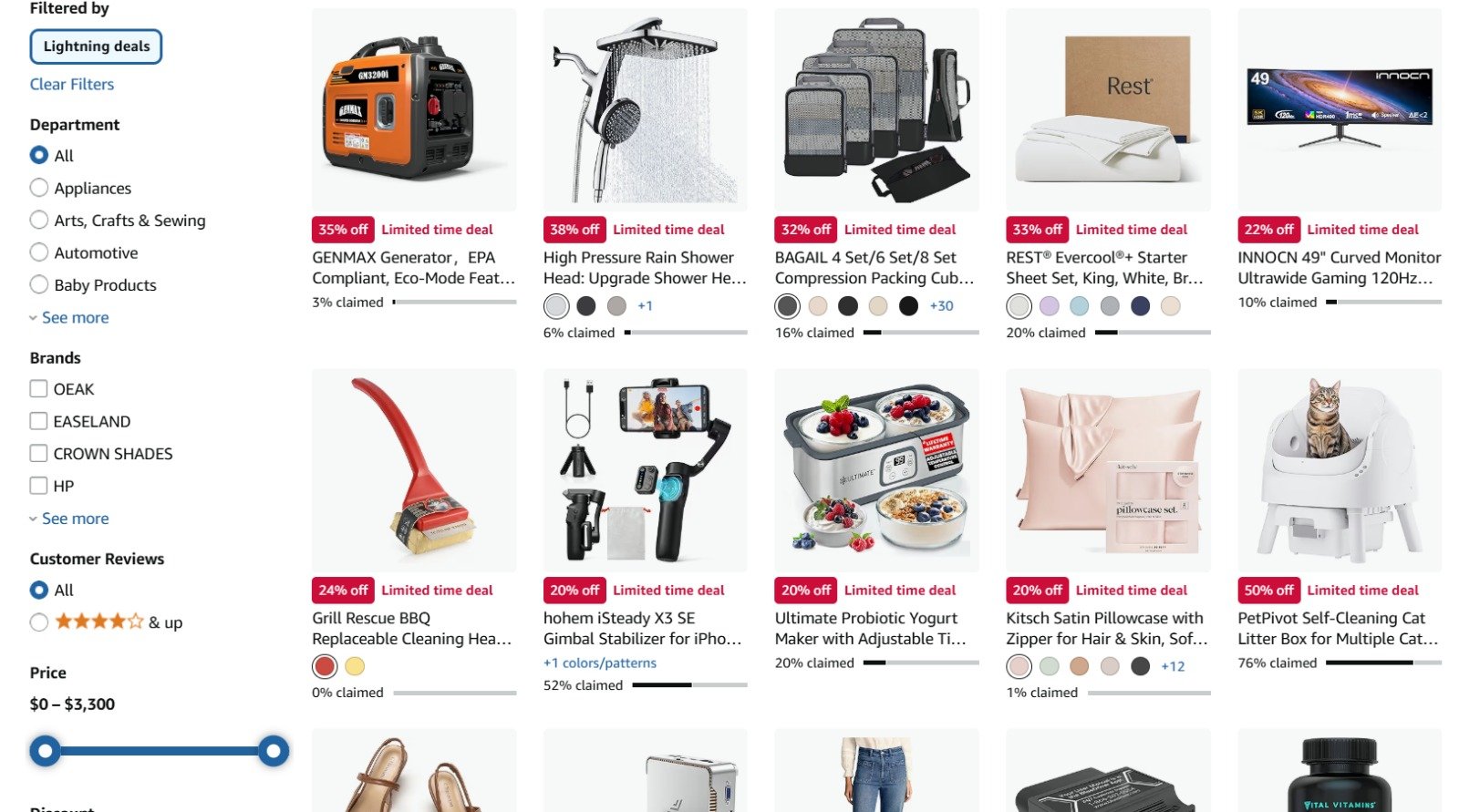
Amazon Lightning Deals are special discounts that run for a short time on selected products. They usually last 4 to 12 hours, or until all the products are sold out. You can see them in the “Today’s Deals” section, one of the most visited pages on Amazon, which means these deals get a lot of attention from shoppers.
The main goal of Lightning Deals is to create urgency. Since the time and stock are limited, products often sell out quickly, so people don’t want to miss out. This pushes them to make a quick decision and buy before the deal ends.
For sellers, Lightning Deals can:
a. Increase product visibility
b. Drive a sudden boost in sales
c. Help clear old or extra inventory
d. Attract new customers who may later buy more at regular prices
For buyers, these deals are exciting and valuable because they can get big discounts on popular items. But since the stock is limited, they need to act quickly to grab the deal before it’s gone.
In short, Lightning Deals help both sellers (with more sales and exposure) and buyers (with cheaper prices). The only rule is — act fast, because once the time or stock is gone, the deal is over.
How Do Lightning Deals Work?
Lightning Deals are special discounts on Amazon that last only for a short time. They create excitement for shoppers and help sellers get quick sales. Here’s how they work in simple steps:
1. Sellers apply for a deal – Sellers start the process by selecting products they want to promote. They submit these products as Lightning Deals through Seller Central. However, not all products are allowed. The item must follow Amazon’s guidelines, like:
a. The product must have good customer ratings (usually 3.5 stars or higher).
b. It must have enough inventory to support the deal.
c. The item should be popular or appealing to a wide audience.
d. The price needs to be lower than usual and competitive compared to similar products.
This screening ensures that only quality products are included for the limited-time offers, which makes shoppers trust these deals and keeps them coming back.
2. Amazon reviews and approves – Once a seller applies, Amazon reviews if the product meets all requirements. If it qualifies, Amazon decides when the deal will run. Sellers usually cannot choose the exact slot themselves. Instead, Amazon schedules it to make sure there are always new deals for shoppers. This way, the shopping experience remains exciting and consistent.
3. Limited time and stock – A Lightning Deal usually runs for only a few hours, often between 4–12 hours. Along with the short duration, Amazon limits the number of units available at the discount. For example, a seller may offer 200 units at the deal price. Once those 200 sell out, the deal ends, even if time is left. On the other hand, if the timer ends but the stock remains, the discount also stops.
This combination of limited time and limited quantity is what makes shoppers act quickly—they know they might lose the deal if they wait too long.
4. Countdown display – On the product page, buyers see a timer showing exactly how much time is left and a progress bar showing how many units have already been claimed. To create urgency, Amazon highlights the time and stock left. For example, “75% claimed” means most of the stock is already sold. This pushes buyers to act fast. This visual urgency strongly encourages buyers to make a fast decision instead of waiting.
5. Shoppers buy quickly – Since time and stock are limited, customers don’t want to miss out. They usually purchase right away instead of adding the item to their cart and thinking later. This gives sellers a sharp boost in sales during the Lightning Deal period. For sellers, this means more visibility, higher sales velocity, and often a boost in product ranking on Amazon.
6. Deal ends – The deal closes when the timer runs out or when all discounted items are sold. After that, the product goes back to its regular price. That’s why these deals feel “lightning fast” for both shoppers and sellers.
For sellers, the after-effect can be just as valuable as the deal itself. Products that perform well often benefit from increased reviews, more traffic to the listing, and even better placement in Amazon’s search results.
Who Can Run Lightning Deals?
Not every Amazon seller can create a Lightning Deal. Amazon has set some clear rules to make sure only reliable sellers with good-quality products can use this feature. As these deals bring a lot of visibility and sales, Amazon wants to make sure customers get the best shopping experience. Here’s what you need to qualify:
1. Professional Seller Account
To run a Lightning Deal, you must be on the Professional Seller plan. Sellers on the free Individual plan are not eligible.
The Professional plan comes with a monthly subscription fee, but it gives you many advantages, such as:
a. Bulk product listing tools.
b. Access to restricted categories that Individual sellers cannot sell in.
c. Advanced reporting tools for better sales tracking.
d. Opportunities to participate in promotions like Lightning Deals.
Amazon restricts Lightning Deals to Professional Sellers because these sellers usually sell regularly, keep proper stock, and are better prepared to handle the sudden increase in sales that comes with these promotions.
2. Good Account Health
Your seller account must be in good standing with Amazon. This means you should not have any recent suspensions, unresolved warnings, or repeated violations of Amazon’s policies.
Amazon measures your account health through certain performance metrics, such as:
a. Order Defect Rate (ODR): Should always be below 1%. This includes negative feedback, all guarantee claims, and chargebacks.
b. Late Shipment Rate: Must be under 4%. Customers expect on-time delivery, especially during deals.
c. Pre-Fulfillment Cancel Rate: Should be below 2.5%. Frequent cancellations show unreliability.
If your account has too many complaints, returns, late or canceled shipments, Amazon won’t allow you to run Lightning Deals. This is because poor performance could lead to negative customer experiences, and Amazon doesn’t want unhappy customers.
3. Products with 3-Star Rating or Higher
The product seller wants to include in a Lightning Deal must have at least an average rating of 3 stars or above from customer reviews. Products with higher ratings (4 or 5 stars) are much more likely to be approved because they show that customers are happy with the quality.
If your product has few reviews or a rating lower than 3 stars, it is best to improve the product first. You can do this by:
a. Enhancing product quality or durability.
b. Improving packaging to reduce damage.
c. Providing quick, helpful customer service.
A Lightning Deal with a low-rated product could create more returns and complaints, which is why Amazon sets this rule.
4. Prime-Eligible Products (FBA or SFP)
Lightning Deals work best when products can be delivered quickly. That’s why your items must be Prime-eligible.
There are two ways to qualify for the Prime badge:
a. FBA (Fulfilled by Amazon): You send your inventory to Amazon’s warehouses, and Amazon handles packaging, shipping, and customer service.
b. SFP (Seller-Fulfilled Prime): You ship items directly from your own warehouse but must meet Amazon’s strict delivery and performance standards to qualify for the Prime badge.
Prime-eligible products ensure buyers get fast and reliable delivery, which makes the deal more attractive. If your product is not Prime-eligible, it will not qualify for Lightning Deals.
5. Price and Stock Requirements
Amazon wants to make sure customers truly get a good deal, so they have certain pricing and inventory rules:
a. Pricing: The Lightning Deal price must be lowest price your product had in the last 30 days (or even lower). In some cases, Amazon may require it to be even lower to ensure buyers are truly getting a discount.
b. Stock Levels: You must have enough inventory to handle a sudden spike in sales during the deal. If your stock is too low, Amazon will not approve the deal.
c. Quantity Commitment: Sometimes, Amazon may ask sellers to set aside a minimum number of units (for example, 20–30 or more) just for the Lightning Deal. This ensures customers don’t miss out too quickly.
If you cannot meet these requirements, Amazon may reject your deal, even if your product meets all the other qualifications.
In short, Amazon allows only serious, consistent, and trusted sellers to run Lightning Deals. You need a Professional Seller account, good account health, well-rated products, Prime eligibility, and the ability to offer the lowest price with enough stock. Meeting these conditions helps Amazon maintain customer trust and ensures that Lightning Deals remain valuable for both buyers and sellers.
Costs of Lightning Deals
Running a Lightning Deal on Amazon is not free. Sellers have to pay a fee to Amazon every time they create a deal. This fee changes with the season and shopping events. For example, during Prime Day, Black Friday, or the holiday season, the fee is much higher than on regular days.
For more detailed information about fees, check out the official page.
Apart from the Amazon fee, sellers also have to sell their products at a discounted price to attract buyers. This lowers the profit made on each item. If the discount is too big, profits may drop even more, and sometimes sellers can even lose money.
Sellers also need to think about stock (inventory) costs. To run a Lightning Deal, you must set aside enough stock to meet the expected demand. If you keep too much stock and it doesn’t sell, you may end up with extra storage charges. But if the deal sells out too fast, you could lose the chance to make more sales.
In short, the costs of Lightning Deals include:
a. Amazon submission fee (varies with season and events)
b. Lower selling price due to discounts
c. Less profit per item
d. Inventory and storage costs
So, before running a Lightning Deal, sellers should carefully calculate whether the extra sales will cover these costs or not.
How to Submit a Lightning Deal?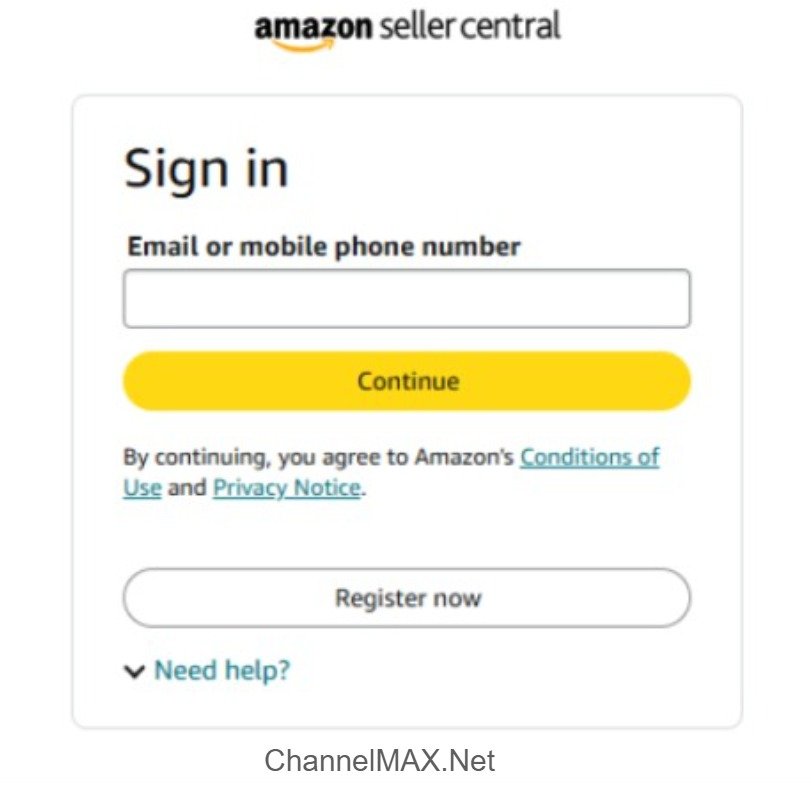
Step 1: Log in to Seller Central
a. Go to Amazon Seller Central and sign in with your seller account.
b. Once logged in, look at the top menu and click on the Advertising tab.
c. This is where Amazon lists all promotional tools, including Deals.
Step 2: Open the Deals Dashboard
a. Under the Advertising tab, click on Deals.
b. This will open the Deals Dashboard, where Amazon shows you all deal opportunities.
c. Here you’ll find different types of promotions, including Lightning Deals and 7-Day Deals.
Step 3: Check if You’re Eligible
a. Not every product can run a Lightning Deal. Amazon automatically checks product performance and eligibility.
b. If your products qualify, you will see them under “Create a New Deal.”
c. If a product is missing, it means it doesn’t meet Amazon’s requirements right now—maybe because of low stock, weak sales, poor reviews, or pricing that doesn’t meet deal standards.
d. You can work on improving these areas and check back again later.
Step 4: Pick a Product
a. From the eligible list, choose the product you want to promote.
b. Amazon will show you the rules for that product, such as:
i) The minimum discount required (usually at least 15–20%).
ii) Maximum deal price allowed.
iii) Minimum number of units you need in stock.
c. Check these carefully to make sure your product can meet the criteria.
Step 5: Add Deal Details
a. Enter the deal price (it must be lower than your recent sale price and competitive with other sellers).
b. Check that you have enough inventory in Amazon’s fulfillment centers to last the whole promotion—deals that run out of stock too quickly may affect.
c. Select the week you’d like your deal to run. Amazon chooses the exact day and time, but you can plan around the week you select.
d. Think ahead—choose weeks where shopping activity is higher (e.g., holidays, Prime Day).
Step 6: Review Fees and Submit
a. Every Lightning Deal comes with a fee, which you must pay to run the promotion.
b. Fees vary depending on the season:
i) Standard days usually have lower fees.
ii) Peak shopping events like Prime Day, Black Friday, Cyber Monday, and Christmas cost more because of higher traffic.
c. Review the fee, make sure your pricing and inventory meet Amazon’s rules, then submit the deal for review.
Step 7: Wait for Amazon’s Approval
a. After submission, Amazon checks your deal details.
b. If approved, Amazon will confirm when your Lightning Deal will go live.
c. If rejected, you’ll usually get a reason (e.g., price not low enough, stock too low) so you can make changes and try again.
Pro Tip: Keep your inventory, ratings, and pricing competitive to increase the chance of Amazon selecting your products for future Lightning Deals.
Benefits of Running Lightning Deals
Lightning Deals are not just for customers looking for discounts. They also give sellers many advantages. Here’s how they help:
1. More visibility
When a product is in a Lightning Deal, it is shown on Amazon’s “Today’s Deals” page and sometimes even the homepage. These pages are visited by millions of shoppers daily, which is much more traffic than a normal product page. This extra visibility helps sellers reach a large audience in just a few hours. Even if some shoppers don’t buy right away, they may remember the product and return later.
Example: A small skincare brand running a Lightning Deal for its face serum may suddenly reach thousands of new customers who didn’t know about the brand before.
2. Boost in sales
Lightning Deals last only 4 to 12 hours and have limited stock. Because of this short time and urgency, shoppers act fast and buy without waiting. This gives sellers a big sales boost that they normally wouldn’t see. The quick sales bring in revenue and also make the product more popular. Even after the deal ends, some customers may still buy at the regular price since they have already noticed the product.
Example: An electronics seller offering Bluetooth headphones in a Lightning Deal may sell hundreds of units in just a few hours. Later, buyers who missed the deal may still purchase at full price.
3. Clear old stock
Keeping too many unsold products in Amazon’s warehouse can be costly because of monthly storage fees and higher long-term storage fees. Lightning Deals help sellers quickly clear out old or slow-selling products. Instead of paying extra for storage, they can turn the stock into sales, free up space, and bring in new products. This is especially helpful during seasonal changes when sellers need to clear out old collections before new collections arrive.
Example: A clothing seller can use Lightning Deals to clear out summer T-shirts before winter jackets arrive in stock.
4. Better product ranking
Amazon ranks products based on sales performance. When a product sells quickly during a Lightning Deal, Amazon marks it as “in demand.” This can push the product higher in search results, making it more visible in future searches. A better rank brings more organic traffic and sales even after the deal is over. So, one short Lightning Deal can create a lasting improvement in product performance.
Example: A kitchen seller offering a mixer in a Lightning Deal may find that even after the deal ends, the mixer stays on the first page of Amazon search results.
5. Attract new buyers
Many shoppers use Lightning Deals to explore new brands or products they haven’t tried before. A big discount encourages them to take the risk and buy. If they like what they buy, they will likely return and purchase again at full price. In this way, sellers not only gain fast sales but also repeat customers. It’s a smart way to turn first-time buyers into repeat buyers.
Example: A new snack brand offering flavored chips in a Lightning Deal can attract first-time buyers who later reorder them at full price because they enjoyed the taste.
6. Build brand trust
Being selected for a Lightning Deal means that Amazon considers the product as high-quality and worth promoting. Shoppers notice this and start trusting the brand more. Products featured on the Deals page look more reliable, helping sellers build a strong brand image. Over time, this trust leads to more confident buyers and repeat purchases.
Example: A fitness equipment brand featured in Lightning Deals for yoga mats builds credibility. Even after the deal, shoppers are more likely to trust and choose the brand over competitors.
Drawbacks of Lightning Deals
Lightning Deals can help you sell products fast, but they also have some drawbacks you should know before joining.
1. High competition
Lots of sellers join Lightning Deals, but Amazon only promotes a few products at a time. Your deal may not get noticed if others offer bigger discounts or more popular products. You might spend money and effort, but still struggle to get sales.
2. Lower profit
You need to give a discount and also pay Amazon’s deal fee. This cuts down your profit. Even if sales increase during the deal, the money you actually earn might be much less. For products with small profit margins, this can be risky.
3. Inventory issues
Amazon requires you to set aside a minimum number of units for each Lightning Deal. If they sell well, this can help you clear inventory quickly. But if customers don’t buy much, you’ll be stuck with extra stock, which could lead to higher storage costs or block your money in inventory.
4. No control on timing
Another limitation is that sellers can’t choose when the deal will run—Amazon decides it. Sometimes, if the deal goes live at a less busy time, fewer people will see it. If it doesn’t match important seasons or your promotions, the results may not be as good.
5. Short-term sales only
Most sales happen only while the deal is active, usually just a few hours. After it ends, sales often return to normal or may even slow down. Unless the deal helps you get new customers or improve your ranking, the benefit might not last long.
Lightning Deals can be a powerful tool to boost visibility and clear stock, but they are not without risk. High competition, reduced profit margins, strict stock commitments, and limited control over timing can make them less effective than they appear. Before participating, sellers should carefully calculate costs and understand everything to stay profitable.
Best Practices for Successful Lightning Deals
1. Choose the right products
Not every product is a good fit for Lightning Deals. Pick products that already sell well, have positive reviews, and are trusted by buyers. Shoppers make decisions fast during deals, so they won’t risk buying something unknown or poorly rated. Items in trending categories like electronics, home essentials, fitness gear, or beauty usually get more clicks. Also, pick products where your deal price looks attractive compared to competitors.
Tip: Avoid very new items or those with poor reviews. A Lightning Deal is not the right place to “test” a product. It works best for items that already have proven demand.
Example: Wireless earbuds with 500+ reviews are safer for a deal than a brand-new headphone model with no feedback.
2. Plan your timing
Timing is everything. A deal during peak shopping seasons gets more traffic and higher sales. Events like Black Friday, Cyber Monday, Prime Day, or festive holidays can bring huge exposure. Even smaller periods like weekends, month-ends, or payday weeks often see a spike in buyers.
Tip: Avoid running Lightning Deals on slow sales days or off-peak hours. You’ll waste money if shoppers aren’t online to see your discount. Also, think about your product’s natural demand cycle—seasonal products (like heaters in winter or gardening tools in spring) should be timed wisely.
Example: Running a fitness equipment deal in early January works great because people set fitness goals for the New Year.
3. Keep enough stock
Not having enough inventory is one of the most common mistakes sellers make. If your product sells out too fast, you miss the chance to capture extra buyers and waste the promotional exposure Amazon provides. Plus, stockouts can hurt your chance of being featured again in Lightning Deals. On the other hand, if you keep too much stock and the deal underperforms, you may end up with extra inventory and higher storage fees.
Tip: Find the right balance by checking past sales, forecasting demand, and planning for at least 5–7x your weekly average sales during big shopping events. Also, ensure your products are in FBA (if you use it) and ready for fast shipping.
Example: If your product usually sells 100 units per week, prepare 500–700 units for a holiday deal when demand is higher.
4. Make your listings better
Even if your product is discounted, buyers won’t purchase if your listing doesn’t look convincing. A Lightning Deal gives traffic, but your listing converts that traffic into sales.
Focus on:
a. Title: Keep it clear, short, and keyword-rich so shoppers quickly know what you’re selling.
b. Images: Use high-quality photos showing the product from different angles, including lifestyle shots, and infographics to show benefits.
c. Bullet points: Focus on what problems the product solves, not just features. Make it easy for shoppers to understand why they should buy.
d. A+ Content/Enhanced Brand Content: If available, add enhanced content to build trust.
e. Reviews: Try to build reviews before running a deal; products with many positive reviews convert much better.
Tip: Think of your listing as your shop window—if it looks messy or unclear, buyers will move to competitors. A professional-looking listing improves conversion rates and helps you stand out from competitors.
Example: Instead of “Stainless Steel Water Bottle – 1 Liter”, write “Durable Stainless Steel Water Bottle, 1L – Keeps Drinks Cold 24H, Leak-Proof, Travel-Friendly.”
5. Review the results
The goal of a Lightning Deal is not just instant sales but also long-term benefits. After the deal, take time to review your performance metrics carefully:
a. Units sold and revenue
b. Deal/advertising fees
c. Profit margins
d. New customer reviews or ratings
e. Increase in organic ranking and visibility
Tip: This data helps you understand if the deal was worth it. Did it improve your Best Seller Rank (BSR)? Did it increase your daily organic sales after the deal? Use this to decide whether to repeat the deal, adjust the pricing, or change the product.
Example: If you sold 300 units but earned very little profit, you may need to lower the discount or choose a cheaper deal fee for next time.
To summarize, a Lightning Deal is more than a quick sale—it’s a marketing tool. With the right product, smart timing, enough stock, a strong listing, and proper review of results, it can boost your ranking, bring new customers, and grow long-term sales.
But they also come with extra costs and lower profits. Sellers need to look at the fees, discounts, and inventory requirements before deciding. If planned well, Lightning Deals can help increase sales volume and brand exposure. But if not managed carefully, they can eat into profit margins. The key is to balance the costs with the benefits.
Also Read: Amazon Advertising Campaign: A Complete Guide to Maximizing Sales
Disclaimer:
Amazon is the registered trademark of the e-commerce brand.
About ChannelMAX.NET:
ChannelMAX offers Amazon Repricer that runs on the latest AI Repricing algorithm to do Amazon Pricing Management or Amazon Repricing. Based on Amazon SP API, the repricing engine or repricer runs 24/7 and efficiently manages Amazon prices to maximize your BuyBox with profit optimization. Established in 2005, ChannelMAX has been integrated with Amazon technology since 2007, helping thousands of third-party sellers on various eCommerce platforms. Some of the eCommerce platforms, aka marketplaces, supported by ChannelMAX.NET, are Amazon, Walmart, eBay, and Shopify. Some of ChannelMAX key offerings include ChannelMAX Amazon Repricer, 2ndly, ChannelMAX Amazon FBA Audits and FBA Refunds management, an offering for managing Amazon FBA Refunds Reimbursement management for lost or damaged or misplaced inventory for which Amazon is responsible and for which sellers deserve appropriate credit reimbursement from Amazon. ChannelMAX Services offer Remote (aka Virtual) Full-Time eCommerce Assistant to help 3P sellers run their daytoday business.

Check ChannelMAX at Amazon Selling Partner Appstore, an application with a 5 star rating.