Amazon Product Bundling Strategy: How to List and Win the Buy Box

Increase order value and boost conversions by strategically combining complementary products.
By ChannelMAX Staff Writer
Nov-2025#09
Amazon product bundles are a great way to stand out from competitors and increase your sales. A product bundle means you sell two or more products together as one item. This gives customers more convenience and can help increase your average order value. Bundles also help reduce direct price competition, improve your Buy Box chances, and make your brand appear more valuable.
But successful bundling is not just about putting random products together. You need to choose the right product combination, set a good price, use strong keywords, add high-quality images, and follow Amazon’s listing rules. Whether you are a seller or a reseller, the right bundle strategy can help your products rank better and generate more revenue.
In this blog, we will cover what Amazon product bundles are, why sellers create them, the different types of bundles, how to choose the right products, how to list a bundle step-by-step, the important rules to follow, common mistakes to avoid, and tips to maximize your bundle sales.
What Are Amazon Product Bundles?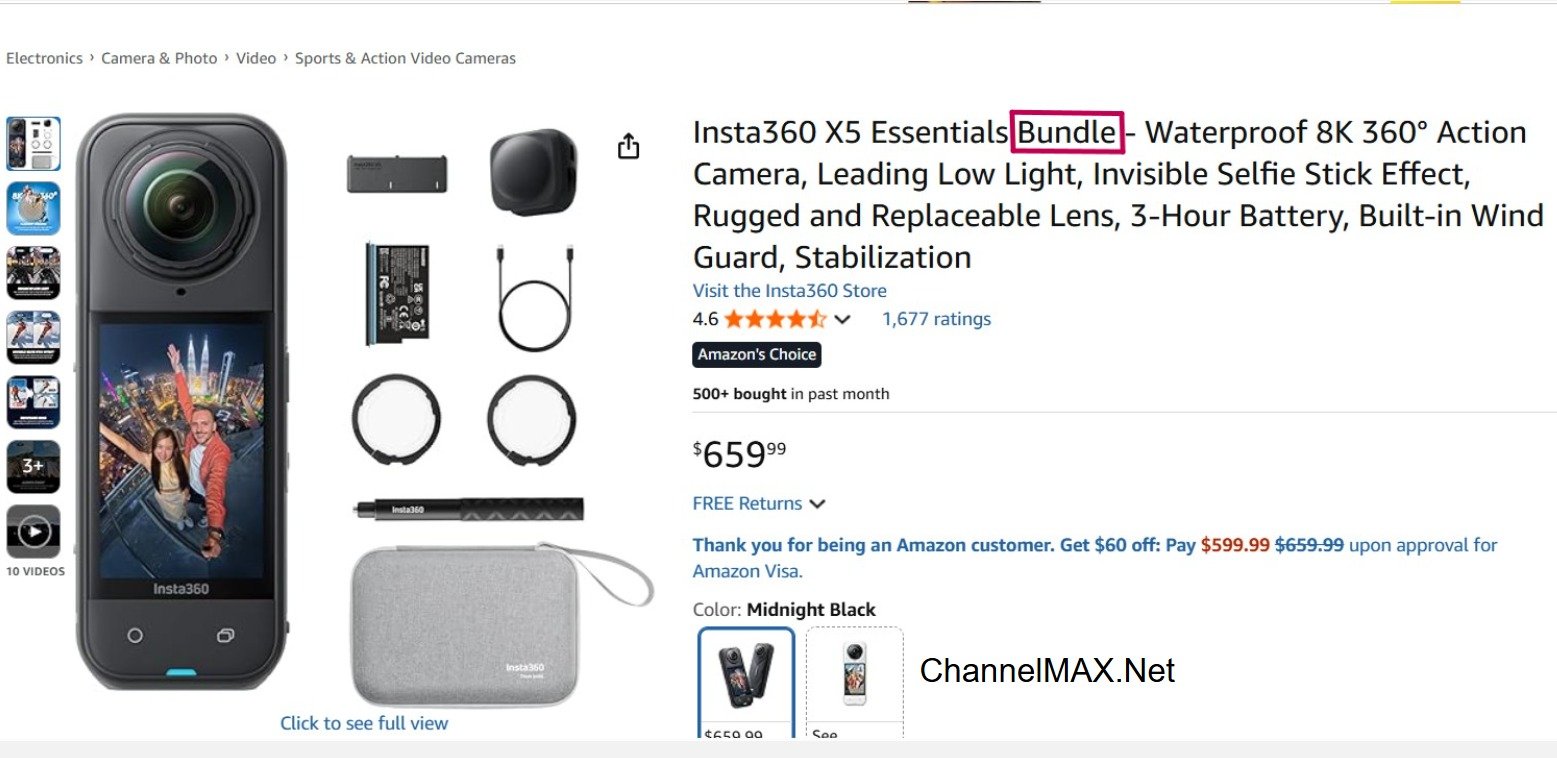
Amazon product bundles are two or more complementary products sold together as a single package. Instead of buying each item separately, the customer gets them together under one listing. The buyer adds the bundle to the cart once, pays once, and receives everything in one shipment.
These products are usually related or used together. The goal is to give the customer more value and convenience. It also helps sellers increase sales by offering a more attractive deal.
This is different from a multipack, where you sell many pieces of the same product (for example, 3 bars of the same soap). In a bundle, each product is different but complements the others.
Examples of Bundles:
a. A hair care combo: Shampoo + Conditioner
(Both are used together for hair care.)
b. A fitness setup: Yoga Mat + Resistance Band + Workout Towel
(Useful for someone doing exercises or yoga at home.)
c. A phone protection kit: Phone Case + Screen Protector
(Both items help protect the phone.)
In short, an Amazon product bundle is a smart way to sell related products together in a convenient and value-packed offer.
Key Benefits of Offering Product Bundles
Product bundles are a smart way to increase sales, reduce competition, and give customers a better shopping experience. Instead of selling products one by one, you group related items together as a group. This makes your offer more attractive and easier for customers to choose. Here are a few reasons why sellers create product bundles:
1. Higher Average Order Value (AOV)
When products are sold as a bundle, customers often end up paying more than if they bought each item separately. This helps you earn more from each sale.
For example, instead of selling a $15 face mask + $10 scrub + $8 toner, you create a complete Skincare Care Kit priced at $34. The customer gets everything they need in one purchase, and you make a higher sale in one order.
Why this works:
a. Customers feel they are getting more value.
b. They don’t have to search for matching or complementary products.
c. It saves their time, which increases the chance of purchase.
2. Less Competition & Better Buy Box Chances
When you sell an item individually, you directly compete with many other sellers selling the same product. But when you create a custom bundle, your listing becomes unique. Other sellers usually won’t have the same combination of products, so there is less direct competition.
Result:
a. Fewer sellers competing for the same listing.
b. Better chances of winning the Buy Box consistently.
c. More stable sales and no constant price wars.
This also helps avoid unnecessary price drops that cut your profit margins.
3. Reduced Shipping & FBA Fees
When you send multiple products in one package, Amazon charges one fulfillment fee instead of separate fees for each item. This makes shipping much more cost-effective. If you were to sell those items one by one, each product would require its own picking, packing, and shipping cost. But as a bundle, everything goes out together in one box. This can significantly lower your Amazon FBA costs.
Best for:
a. Lightweight products
b. Small accessories
c. Beauty and personal care items
d. Home decor sets
Lower fees mean higher profit margins. Even saving a few dollars per order can add up to a significant amount when you are selling in volume. Meanwhile, customers still receive all the items they need in one delivery, which adds to a smoother shopping experience.
Also Read: How to Reduce Amazon FBA Fees
4. Better Customer Experience & Satisfaction
Customers love convenience. When you bundle products that are meant to be used together, buyers feel happy that they don’t need to search for matching or related items separately. This saves them time and effort, and also ensures that all the items work well together.
For example, a camera bundle that includes a memory card, case, and tripod makes it easy for the buyer. Instead of buying each item separately, they get a complete solution instantly.
Benefits:
a. More positive reviews
b. Higher chances of repeat orders
c. Better brand trust and loyalty
5. Stronger Brand Positioning
Bundles show that your brand understands customer needs and provides complete solutions, not just products. It makes you look thoughtful and customer-focused.
How this helps your brand:
a. You look more professional compared to sellers who only list single items.
b. Customers remember your brand because you solve problems more clearly.
c. It becomes easier to build a loyal customer base over time.
Bundles help you stand out, sell more, cut costs, and make customers happier. They are one of the easiest ways to grow your Amazon business while keeping your brand strong and competitive.
Types of Amazon Product Bundles
Amazon sellers often use product bundles to give customers more value and convenience. Bundling related items together can help increase sales and make the buying experience smoother. Here are the types of Amazon product bundles:
1. Complementary Product Bundles – Items that are often used together
These bundles include items that people usually buy or use at the same time. The idea is to make shopping easier by combining related items that customers usually buy together.
Example: A coffee maker with coffee filters or a toaster with bread spreads. This type of bundle saves buyers time and ensures they have everything they need in one purchase.
2. Value Bundles – Main product with useful add-ons
A value bundle usually includes one main product and a few helpful accessories that enhance its use. It helps customers get more for their money, making the deal more appealing to customers.
Example: A laptop with a carrying sleeve and a wireless mouse. It gives buyers a complete setup instead of buying each thing separately. Buyers feel they’re getting better value since they receive all the essentials needed to use the main product effectively.
3. Gift Bundles – Themed sets perfect for gifting
These bundles are made for special occasions and make gifting easier. They include products that are chosen to make a thoughtful and ready-to-give present, saving buyers the effort of finding individual items.
Example: A baby shower gift set with baby lotion, soap, and soft toys, or a spa kit with bath salts, candles, and essential oils. These are perfect for people looking for quick and thoughtful gift ideas.
4. Seasonal Bundles – Special collections for holidays or events
Seasonal bundles are created for holidays or certain times of the year. They attract buyers looking for themed products during that season or event.
Example: A Christmas decoration bundle with ornaments and lights, or a summer beach bundle with sunscreen, towels, and flip-flops. These bundles make it easy to get everything needed for the occasion in one go.
Creating the right type of product bundle can attract more customers and increase your Amazon sales. It’s all about offering value, convenience, and a better shopping experience.
How to Choose Products for Bundling?
1. Pick products that solve a problem together
When planning a bundle, choose products that complement each other and make sense when used together. For example, a skincare set with a cleanser, toner, and moisturizer gives customers a complete routine instead of separate products. Bundles that solve a specific problem or provide a full experience attract more buyers and increase the perceived value of your offer.
2. Ensure consistent demand
Before creating a bundle, check if each product in it has a stable sales history. If the products have consistent demand, then your bundle is more likely to sell well. Even if one product sells well, pairing it with a low-demand item can slow down sales.
You can use data from your Amazon Seller Central or other analytics tools to spot trends. Focus on products that already have proven popularity so that your bundle stays relevant and continues to move quickly.
3. Check sales rank for popularity
Always check the sales rank of each product before bundling. A good sales rank is a sign that customers are already buying those items. Avoid including products with poor or fluctuating sales ranks, as they can bring down the performance of your entire bundle.
With tools, you can quickly identify which ASINs are performing best and build your bundles around those proven winners. Bundling popular items helps improve visibility and ensures that your new listing gets attention faster.
4. Avoid unrelated combinations
Don’t just combine random items together to make a bundle. Bundles should make sense to the buyer. For example, pairing a phone charger with a laptop cover makes no sense to a customer and reduces the chance of conversion. Bundles that serve a clear purpose always convert better. Stick to combinations that naturally go together—like kitchen utensils or workout accessories—so your bundle feels purposeful and useful.
5. Use competitor keyword research
Keyword insights are key to discovering what customers really want. This helps you understand customer search intent and identify product combinations that people are actively looking for. Using this insight, you can create bundles that meet real demand and stand out in Amazon search results.
Analyze your competitors’ listings to see which keywords they rank for, especially those related to “bundle,” “set,” or “kit.” Optimizing your bundle title and description with the right keywords improves visibility.
How to List an Amazon Product Bundle (Step-by-Step)?
If you sell on Amazon, creating product bundles is a smart way to increase sales and stand out from competitors. Here’s an easy step-by-step guide to help you list your own Amazon product bundles correctly and successfully.
Step 1: Choose Products That Go Well Together
The first step is choosing the right products. The products in your bundle should complement each other or be used together. Pick items that are frequently used together, solve a complete problem, or help customers save time and money.
For example:
a. A coffee bundle: coffee beans + reusable coffee filter + travel mug
b. A skincare bundle: face wash + moisturizer + sunscreen
c. A pet care bundle: shampoo + brush + nail clipper
To find good product combinations:
a. Check Amazon’s “Frequently Bought Together” section under product listings.
b. Use Amazon Brand Analytics to see customer buying trends.
c. Analyze competitor bundles and look for gaps you can fill.
d. Read customer reviews to understand.
Tip: Focus on bundles that solve a problem or make life easier for the customer.
Step 2: Get a Unique Code (UPC / GTIN) for the Bundle
Every Amazon product listing needs a unique identifier — a barcode or GTIN. Since your bundle is a new product (not just individual items grouped together), it needs its own UPC or GTIN so Amazon can track it as a separate item.
You have two options:
a. Buy a UPC from GS1 – This is the only source Amazon recognizes as authentic.
b. Apply for a GTIN exemption – If you’re a brand-registered seller, you can request this from Amazon without buying a new UPC.
Note: Avoid using UPCs from unverified sellers. This can cause listing errors or even suspension.
Step 3: Create a New Product Listing in Seller Central
Log in to your Amazon Seller Central account and create a new product listing using your unique UPC/GTIN.
Important:
a. Do not add your bundle as a variation under any existing product listing (for example, “Size” or “Color”).
b. Amazon treats bundles as completely new products, so it needs its own product page.
When creating the listing:
a. Select the right category for your bundle.
b. Choose “New” as the condition.
c. Fill in all product details accurately.
Pro Tip: Use clear, simple details when filling in your listing — the correct category, brand name, and product type are essential for visibility and approval.
Step 4: Write a Clear and Optimized Product Title
Your product title is the first thing shoppers see, so make sure it clearly tells them what the bundle includes and why it’s useful.
Include:
a. The main product and supporting items.
b. The quantity or size of each item.
c. The purpose or benefit of the set.
Example: “Hair Repair Kit – Argan Oil Shampoo + Conditioner + Serum (3-Piece Set) – Moisturizing & Strengthening Bundle”
Tips:
a. Keep the title under 200 characters.
b. Use keywords naturally (avoid keyword stuffing) for better search ranking.
c. Capitalize the first letter of each word for readability.
Also Read: How to Write an Amazon Product Listing That Ranks High and Wins More Customers
Step 5: Use High-Quality, Informative Images
Images play a huge role in convincing customers to buy. Your photos should clearly show everything that comes in the bundle and highlight how it benefits the buyer. Good images help customers understand what they’re buying and improve click-through rates.
Include:
a. Main image: Show all products together clearly against a white background.
b. Individual images: Show each item in detail (close-up shots).
c. Lifestyle images: Show the bundle in use (e.g., a person using all items together).
d. Benefit or comparison images: Highlight what makes your bundle valuable or unique.
Extra Tip:
Use at least 5–7 images, following Amazon’s image guidelines. High-quality visuals can increase your conversion rate significantly and help your listing rank better over time.
Step 6: Write Benefit-Focused Bullets and Descriptions
Focus on why a customer should buy your bundle — not just what’s in it.
Example bullet points:
a. “Everything you need for daily frizz control.”
b. “Saves time and money — no need to buy each item separately.”
c. “Perfect gift set for birthdays or holidays.”
Some helpful keywords to include are “Gift set”, “Bundle”, “Combo pack”, “Value set”, “Complete kit”, etc.
In your product description:
a. Explain the main purpose of the bundle.
b. Highlight the benefits and results customers can expect.
c. Keep paragraphs short and easy to read.
d. Use your top keywords naturally.
Step 7: Set Smart and Competitive Pricing
Pricing is key to your bundle’s success. The bundle price should feel like a great deal to shoppers while still giving you a healthy profit margin.
Pricing Tips:
a. Compare your bundle’s total cost with the combined price of the individual items. Highlight savings in your listing (e.g., “Save 15% vs buying separately”).
b. Offer a small discount to make it more attractive.
c. Always count Amazon FBA fees — bundles can be bigger or heavier, which may increase costs.
Use a smart repricer like ChannelMAX Repricer to adjust your prices based on market competition automatically. This helps you stay competitive, win the Buy Box, and protect your profit margins.
Step 8: Pack and Label the Bundle Properly
Before sending your bundle to FBA (Fulfillment by Amazon), make sure all items are packaged together as one unit.
Use:
a. Polybags or shrink wrap for smaller bundles.
b. Boxes for fragile or multiple-item bundles.
c. A clear “Do Not Separate” label on the package.
Amazon requires all bundle items to be packaged as one single unit before shipping to FBA. Each bundle must arrive at the warehouse as a complete, ready-to-sell set. Proper packaging helps reduce damage and returns. It also ensures customers receive exactly what you promised.
Pro Tip: Print an insert card or thank-you note inside the bundle package — it helps build your brand and improve customer loyalty.
Product bundling on Amazon is one of the smartest ways to increase sales, build customer loyalty, and stand out from competitors. By offering value-packed combinations and optimizing your listing with strong images, keywords, and pricing, you can create bundles that customers love — and keep buying again and again. And with tools like ChannelMAX Repricer, managing bundle pricing and staying competitive becomes effortless.
Amazon Bundle Policy: Important Rules to Remember
To keep your listings active and avoid any account problems, follow these key Amazon bundle rules:
1. Offer Real Value
Your bundle should make sense to the buyer and provide extra value compared to buying the products separately. For example, selling a camera with a memory card and case adds value because they’re used together. But combining random items, like a camera and a phone case, will not be accepted as a valid bundle.
2. Create Unique Listings
Every bundle needs to stand out with its own product title, images, and detailed description. This helps customers understand what’s included in the bundle and prevents confusion with single products. You should never copy titles or descriptions from existing listings, as this can cause errors or listing removals.
3. Use a Separate SKU and FNSKU
Each bundle must have its own unique SKU and FNSKU code. These identifiers help Amazon track your bundled inventory separately from individual products. Reusing codes from other listings can cause major fulfillment and listing issues.
4. Multipacks Are Not Bundles
Selling multiple units of the same item (like a pack of 3 T-shirts) is called a multipack. A bundle, on the other hand, combines different products that complement each other. Amazon considers them as two different categories, so make sure you list them under the correct category.
5. Don’t Mix Branded and Unbranded Products
If your bundle contains branded items, all products in the bundle should belong to the same brand — unless that brand specifically allows you to combine them with unbranded or other-branded items. Mixing them without approval can lead to listing removal or even account warnings.
6. Identify the Main Product Clearly
Every bundle must have a clearly defined main product, especially when it includes items from different categories. For example, in a “Coffee Maker Bundle,” the coffee maker is the main item, and accessories like filters or mugs are secondary. The main product should be highlighted in your title, image, and product details to avoid confusion.
Common Mistakes to Avoid
1. Not Highlighting the Value of the Bundle
Many sellers forget to explain why their bundle is a better deal than buying each item separately. Customers love bundles that save time, effort, or money — but they need to see that value clearly. Mention the total savings in your product description, highlight convenience (“everything you need in one pack”), and how the products work well together. The clearer the value you show, the higher the chances of conversion.
2. Incorrect Pricing
Pricing can make or break your bundle’s success. Avoid setting prices too high or too low. If the price is too high, shoppers will look for cheaper alternatives. If it’s too low, you may lose profits and even make the bundle look “cheap.” Find a balance by researching other similar listings and considering your costs, Amazon fees, and competitor prices. An attractive, fair price can increase your chances of winning the Buy Box.
3. Poor-Quality Images
Images play an important role in conversion. Using unclear, cropped, or low-quality images can confuse buyers or make your listing look unprofessional. Always upload high-resolution images that show every product in the bundle from different angles. Use a clean white background and include at least one image showing all the bundled items together.
4. Missing Important Keywords
Even the best bundle won’t sell if shoppers can’t find it. Make sure your title and description include relevant keywords like “gift set,” “starter kit,” “combo pack,” or “value pack.” These terms match what buyers actually search for on Amazon. Use keyword tools to identify high-volume search terms and naturally include them in your listing.
5. Ignoring Competitor Bundles
Failing to track competitors can cause you to miss out on valuable trends. Regularly check similar bundles to see how they price, title, and describe their products. Look for gaps in the market — maybe you can offer better packaging, add an item, or price slightly lower. Keeping an eye on competitors helps you stay updated and make smarter listing decisions.
Tips to Maximize Bundle Sales 
Creating product bundles on Amazon is a smart way to increase your average order value, improve visibility, and offer more value to customers. However, success with bundles isn’t just about grouping products together — it’s about strategy, presentation, and continuous optimization. Here are some tips to help you drive more sales from your Amazon bundles.
1. Find the Right Keywords
Your bundle won’t sell if shoppers can’t find it in Amazon search. Start with proper keyword research. Use tools like Amazon Brand Analytics to discover what buyers are typing into the search bar. Focus on phrases such as “gift set,” “combo pack,” “starter kit,” “complete bundle,” or category-specific keywords like “skincare bundle” or “kitchen essentials set.”
Include these terms naturally in your title, bullet points, and backend keywords. The goal is to match your product listing with your target customer’s exact search intent — so your bundle appears right where they’re looking.
2. Highlight Value with a Comparison Chart
Your A+ Content is the perfect space to show why your bundle is a better deal. Add a clean, easy-to-read comparison chart that shows what’s included, the total value if bought separately, and how much customers save with your bundle.
For example, if your bundle includes three kitchen tools that cost $15 each individually, highlight how the complete bundle costs $35 — saving buyers $10.
Highlight the extra benefits — such as convenience, uniqueness, or perfect product pairing (for example, “products that work best together”). Visuals speak louder than words, so use icons, short phrases, and brand colors to highlight key points. When customers see the value clearly, conversion rates naturally rise.
Also Read: Mastering Amazon A+ Content: Guidelines for Creating High-Impact Product Listings
3. Stay Competitive with Smart Pricing
Pricing can make or break your bundle’s success. Amazon’s marketplace is highly dynamic, and price competition is fierce. While setting prices manually may work initially, but competitive categories require automation.
With ChannelMAX, you can automatically track competitors’ pricing, adjust your price in real time, and stay profitable — all without constant manual effort. A smart repricing strategy ensures you maintain visibility in the Buy Box while protecting your margins. Experiment with price points to find the “sweet spot” that maximizes both sales volume and profit.
4. Encourage More Reviews
Customer reviews are critical for trust and ranking. Positive reviews build credibility and directly influence conversion rates. To earn them naturally, focus on creating a positive unboxing and post-purchase experience.
Use high-quality, eco-friendly packaging that feels premium. Include a short thank-you note, product care guide, or setup tips. A small gesture goes a long way — it builds goodwill and encourages customers to leave feedback.
After the purchase, send a polite follow-up message (using Amazon’s permitted communication methods) encouraging customers to share their feedback. Remember, consistent positive reviews not only improve ranking but also drive trust and repeat purchases.
5. Drive Visibility with Amazon PPC
Even the best product won’t sell if buyers can’t find it. Amazon Sponsored Product, Sponsored Brand, and Sponsored Display campaigns are your best tools for driving traffic.
Target bundle-related keywords like “gift set,” “starter kit,” “combo,” “value pack,” or “bundle for [specific need]” (e.g., “coffee lover bundle”). Sellers can start with automatic campaigns to gather data, then switch to manual targeting for better control and ROI.
Monitor performance regularly and adjust bids based on click-through rate (CTR) and conversions. Advertising helps you appear in front of high-intent buyers — especially in competitive niches. PPC ads not only bring traffic but also help in improving organic ranking over time.
Also Read: Amazon Advertising Campaign: A Complete Guide to Maximizing Sales
6. Use Eye-Catching Images and Videos
Visuals sell faster than words. Show every product in the bundle with high-resolution images that are bright, clean, and informative. Use one image to display all items together, and others to highlight individual products.
Lifestyle photos and short videos help customers visualize a product's real-world use — like how your bundle fits into their daily routine. Amazon also supports 360° images and short explainer clips, which can significantly increase engagement. If possible, include a short video explaining how the items complement each other.
7. Write Compelling Copy That Sells
Strong product copy converts browsers into buyers. Explain how your bundle saves time, adds convenience, or solves a problem for the buyer.
Keep bullet points straightforward and benefit-driven. For example, instead of saying “Includes 3 kitchen tools,” you can say “Everything you need for effortless cooking — whisk, tongs, and spatula in one smart bundle.” Maintain a confident, friendly, and brand-aligned tone. Remember that clear, simple writing performs best, especially on mobile.
8. Track, Analyze, and Improve Regularly
The key to long-term success lies in monitoring performance. Amazon’s marketplace changes constantly — what works today might not work tomorrow. Track your bundle’s performance using Amazon Brand Analytics or third-party tools. Check your bundle’s sales trends, conversion rates, advertising performance, and customer feedback regularly.
Use this data to experiment with new keywords, updated images, or a slightly different pricing approach every few weeks. Seasonal adjustments also help — for example, promoting “gift bundles” during holidays. So continuous optimization keeps your listings relevant and profitable.
Product bundling is one of the smartest ways to boost your Amazon sales — when done right. By combining data-driven keyword targeting, smart pricing, and engaging visuals, you can turn your bundles into consistent bestsellers. Keep testing, refining, and improving — success on Amazon comes to those who stay adaptable and customer-focused.
To summarize, Product bundles are a great way for Amazon sellers to stand out, boost sales, and attract customers who like convenient shopping. By choosing the right mix of products, creating well-optimized listings, and using smart pricing tools like ChannelMAX Repricer, sellers can win the Buy Box more often and grow a more profitable Amazon business.
In the long run, bundling not only helps reduce competition but also improves customer satisfaction, as buyers feel they’re getting more value for their money. With the right strategy, product bundles can turn into a steady source of repeat sales and help sellers build a stronger brand presence on Amazon.
Disclaimer:
Amazon is the registered trademark of the e-commerce brand.
About ChannelMAX.NET:
ChannelMAX offers Amazon Repricer that runs on the latest AI Repricing algorithm to do Amazon Pricing Management or Amazon Repricing. Based on Amazon SP API, the repricing engine or repricer runs 24/7 and efficiently manages Amazon prices to maximize your BuyBox with profit optimization. Established in 2005, ChannelMAX has been integrated with Amazon technology since 2007, helping thousands of third-party sellers on various eCommerce platforms. Some of the eCommerce platforms, aka marketplaces, supported by ChannelMAX.NET, are Amazon, Walmart, eBay, and Shopify. Some of ChannelMAX key offerings include ChannelMAX Amazon Repricer, 2ndly, ChannelMAX Amazon FBA Audits and FBA Refunds management, an offering for managing Amazon FBA Refunds Reimbursement management for lost or damaged or misplaced inventory for which Amazon is responsible and for which sellers deserve appropriate credit reimbursement from Amazon. ChannelMAX Services offer Remote (aka Virtual) Full-Time eCommerce Assistant to help 3P sellers run their daytoday business.

Check ChannelMAX at Amazon Selling Partner Appstore, an application with a 5 star rating.